> ## Documentation Index
> Fetch the complete documentation index at: https://developer.suki.ai/llms.txt
> Use this file to discover all available pages before exploring further.

# Home Page

> Suki developer documentation provides everything you need to integrate Suki's powerful AI and Ambient intelligence capabilities into your healthcare application

export const HpBadgeIco = ({ children }) => (
  <span className="hp-badge-icon" aria-hidden="true">
    {children}
  </span>
);

export const SiSwagger = () => (
  <svg xmlns="http://www.w3.org/2000/svg" viewBox="0 0 24 24" fill="currentColor" aria-hidden="true">
    <path d="M12 0C5.383 0 0 5.383 0 12s5.383 12 12 12c6.616 0 12-5.383 12-12S18.616 0 12 0zm0 1.144c5.995 0 10.856 4.86 10.856 10.856 0 5.995-4.86 10.856-10.856 10.856-5.996 0-10.856-4.86-10.856-10.856C1.144 6.004 6.004 1.144 12 1.144zM8.37 5.868a6.707 6.707 0 0 0-.423.005c-.983.056-1.573.517-1.735 1.472-.115.665-.096 1.348-.143 2.017-.013.35-.05.697-.115 1.038-.134.609-.397.798-1.016.83a2.65 2.65 0 0 0-.244.042v1.463c1.126.055 1.278.452 1.37 1.629.033.429-.013.858.015 1.287.018.406.073.808.156 1.2.259 1.075 1.307 1.435 2.575 1.218v-1.283c-.203 0-.383.005-.558 0-.43-.013-.591-.12-.632-.535-.056-.535-.042-1.08-.075-1.62-.064-1.001-.175-1.988-1.153-2.625.503-.37.868-.812.983-1.398.083-.41.134-.821.166-1.237.028-.415-.023-.84.014-1.25.06-.665.102-.937.9-.91.12 0 .235-.017.369-.027v-1.31c-.16 0-.31-.004-.454-.006zm7.593.009a4.247 4.247 0 0 0-.813.06v1.274c.245 0 .434 0 .623.005.328.004.577.13.61.494.032.332.031.669.064 1.006.065.669.101 1.347.217 2.007.102.544.475.95.941 1.283-.817.549-1.057 1.333-1.098 2.215-.023.604-.037 1.213-.069 1.822-.028.554-.222.734-.78.748-.157.004-.31.018-.484.028v1.305c.327 0 .627.019.927 0 .932-.055 1.495-.507 1.68-1.412.078-.498.124-1 .138-1.504.032-.461.028-.927.074-1.384.069-.715.397-1.01 1.112-1.057a.972.972 0 0 0 .199-.046v-1.463c-.12-.014-.204-.027-.291-.032-.536-.023-.804-.203-.937-.71a5.146 5.146 0 0 1-.152-.993c-.037-.618-.033-1.241-.074-1.86-.08-1.192-.794-1.753-1.887-1.786zm-6.89 5.28a.844.844 0 0 0-.083 1.684h.055a.83.83 0 0 0 .877-.78v-.046a.845.845 0 0 0-.83-.858zm2.911 0a.808.808 0 0 0-.834.78c0 .027 0 .05.004.078 0 .503.342.826.859.826.507 0 .826-.332.826-.853-.005-.503-.342-.836-.855-.831zm2.963 0a.861.861 0 0 0-.876.835c0 .47.378.849.849.849h.009c.425.074.853-.337.881-.83.023-.457-.392-.854-.863-.854z" />
  </svg>
);

export const SiReact = () => (
  <svg xmlns="http://www.w3.org/2000/svg" viewBox="0 0 24 24" fill="currentColor" aria-hidden="true">
    <path d="M14.23 12.004a2.236 2.236 0 0 1-2.235 2.236 2.236 2.236 0 0 1-2.236-2.236 2.236 2.236 0 0 1 2.235-2.236 2.236 2.236 0 0 1 2.236 2.236zm2.648-10.69c-1.346 0-3.107.96-4.888 2.622-1.78-1.653-3.542-2.602-4.887-2.602-.41 0-.783.093-1.106.278-1.375.793-1.683 3.264-.973 6.365C1.98 8.917 0 10.42 0 12.004c0 1.59 1.99 3.097 5.043 4.03-.704 3.113-.39 5.588.988 6.38.32.187.69.275 1.102.275 1.345 0 3.107-.96 4.888-2.624 1.78 1.654 3.542 2.603 4.887 2.603.41 0 .783-.09 1.106-.275 1.374-.792 1.683-3.263.973-6.365C22.02 15.096 24 13.59 24 12.004c0-1.59-1.99-3.097-5.043-4.032.704-3.11.39-5.587-.988-6.38-.318-.184-.688-.277-1.092-.278zm-.005 1.09v.006c.225 0 .406.044.558.127.666.382.955 1.835.73 3.704-.054.46-.142.945-.25 1.44-.96-.236-2.006-.417-3.107-.534-.66-.905-1.345-1.727-2.035-2.447 1.592-1.48 3.087-2.292 4.105-2.295zm-9.77.02c1.012 0 2.514.808 4.11 2.28-.686.72-1.37 1.537-2.02 2.442-1.107.117-2.154.298-3.113.538-.112-.49-.195-.964-.254-1.42-.23-1.868.054-3.32.714-3.707.19-.09.4-.127.563-.132zm4.882 3.05c.455.468.91.992 1.36 1.564-.44-.02-.89-.034-1.345-.034-.46 0-.915.01-1.36.034.44-.572.895-1.096 1.345-1.565zM12 8.1c.74 0 1.477.034 2.202.093.406.582.802 1.203 1.183 1.86.372.64.71 1.29 1.018 1.946-.308.655-.646 1.31-1.013 1.95-.38.66-.773 1.288-1.18 1.87-.728.063-1.466.098-2.21.098-.74 0-1.477-.035-2.202-.093-.406-.582-.802-1.204-1.183-1.86-.372-.64-.71-1.29-1.018-1.946.303-.657.646-1.313 1.013-1.954.38-.66.773-1.286 1.18-1.868.728-.064 1.466-.098 2.21-.098zm-3.635.254c-.24.377-.48.763-.704 1.16-.225.39-.435.782-.635 1.174-.265-.656-.49-1.31-.676-1.947.64-.15 1.315-.283 2.015-.386zm7.26 0c.695.103 1.365.23 2.006.387-.18.632-.405 1.282-.66 1.933-.2-.39-.41-.783-.64-1.174-.225-.392-.465-.774-.705-1.146zm3.063.675c.484.15.944.317 1.375.498 1.732.74 2.852 1.708 2.852 2.476-.005.768-1.125 1.74-2.857 2.475-.42.18-.88.342-1.355.493-.28-.958-.646-1.956-1.1-2.98.45-1.017.81-2.01 1.085-2.964zm-13.395.004c.278.96.645 1.957 1.1 2.98-.45 1.017-.812 2.01-1.086 2.964-.484-.15-.944-.318-1.37-.5-1.732-.737-2.852-1.706-2.852-2.474 0-.768 1.12-1.742 2.852-2.476.42-.18.88-.342 1.356-.494zm11.678 4.28c.265.657.49 1.312.676 1.948-.64.157-1.316.29-2.016.39.24-.375.48-.762.705-1.158.225-.39.435-.788.636-1.18zm-9.945.02c.2.392.41.783.64 1.175.23.39.465.772.705 1.143-.695-.102-1.365-.23-2.006-.386.18-.63.406-1.282.66-1.933zM17.92 16.32c.112.493.2.968.254 1.423.23 1.868-.054 3.32-.714 3.708-.147.09-.338.128-.563.128-1.012 0-2.514-.807-4.11-2.28.686-.72 1.37-1.536 2.02-2.44 1.107-.118 2.154-.3 3.113-.54zm-11.83.01c.96.234 2.006.415 3.107.532.66.905 1.345 1.727 2.035 2.446-1.595 1.483-3.092 2.295-4.11 2.295-.22-.005-.406-.05-.553-.132-.666-.38-.955-1.834-.73-3.703.054-.46.142-.944.25-1.438zm4.56.64c.44.02.89.034 1.345.034.46 0 .915-.01 1.36-.034-.44.572-.895 1.095-1.345 1.565-.455-.47-.91-.993-1.36-1.565z" />
  </svg>
);

export const SiJavaScript = () => (
  <svg xmlns="http://www.w3.org/2000/svg" viewBox="0 0 24 24" fill="currentColor" aria-hidden="true">
    <path d="M0 0h24v24H0V0zm22.034 18.276c-.175-1.095-.888-2.015-3.003-2.873-.736-.345-1.554-.585-1.797-1.14-.091-.33-.105-.51-.046-.705.15-.646.915-.84 1.515-.66.39.12.75.42.976.9 1.034-.676 1.034-.676 1.755-1.125-.27-.42-.404-.601-.586-.78-.63-.705-1.469-1.065-2.834-1.034l-.705.089c-.676.165-1.32.525-1.71 1.005-1.14 1.291-.811 3.541.569 4.471 1.365 1.02 3.361 1.244 3.616 2.205.24 1.17-.87 1.545-1.966 1.41-.811-.18-1.26-.586-1.755-1.336l-1.83 1.051c.21.48.45.689.81 1.109 1.74 1.756 6.09 1.666 6.871-1.004.029-.09.24-.705.074-1.65l.046.067zm-8.983-7.245h-2.248c0 1.938-.009 3.864-.009 5.805 0 1.232.063 2.363-.138 2.711-.33.689-1.18.601-1.566.48-.396-.196-.597-.466-.83-.855-.063-.105-.11-.196-.127-.196l-1.825 1.125c.305.63.75 1.172 1.324 1.517.855.51 2.004.675 3.207.405.783-.226 1.458-.691 1.811-1.411.51-.93.402-2.07.397-3.346.012-2.054 0-4.109 0-6.179l.004-.056z" />
  </svg>
);

export const SiSwift = () => (
  <svg xmlns="http://www.w3.org/2000/svg" viewBox="0 0 24 24" fill="currentColor" aria-hidden="true">
    <path d="M7.508 0c-.287 0-.573 0-.86.002-.241.002-.483.003-.724.01-.132.003-.263.009-.395.015A9.154 9.154 0 0 0 4.348.15 5.492 5.492 0 0 0 2.85.645 5.04 5.04 0 0 0 .645 2.848c-.245.48-.4.972-.495 1.5-.093.52-.122 1.05-.136 1.576a35.2 35.2 0 0 0-.012.724C0 6.935 0 7.221 0 7.508v8.984c0 .287 0 .575.002.862.002.24.005.481.012.722.014.526.043 1.057.136 1.576.095.528.25 1.02.495 1.5a5.03 5.03 0 0 0 2.205 2.203c.48.244.97.4 1.498.495.52.093 1.05.124 1.576.138.241.007.483.009.724.01.287.002.573.002.86.002h8.984c.287 0 .573 0 .86-.002.241-.001.483-.003.724-.01a10.523 10.523 0 0 0 1.578-.138 5.322 5.322 0 0 0 1.498-.495 5.035 5.035 0 0 0 2.203-2.203c.245-.48.4-.972.495-1.5.093-.52.124-1.05.138-1.576.007-.241.009-.481.01-.722.002-.287.002-.575.002-.862V7.508c0-.287 0-.573-.002-.86a33.662 33.662 0 0 0-.01-.724 10.5 10.5 0 0 0-.138-1.576 5.328 5.328 0 0 0-.495-1.5A5.039 5.039 0 0 0 21.152.645 5.32 5.32 0 0 0 19.654.15a10.493 10.493 0 0 0-1.578-.138 34.98 34.98 0 0 0-.722-.01C17.067 0 16.779 0 16.492 0H7.508zm6.035 3.41c4.114 2.47 6.545 7.162 5.549 11.131-.024.093-.05.181-.076.272l.002.001c2.062 2.538 1.5 5.258 1.236 4.745-1.072-2.086-3.066-1.568-4.088-1.043a6.803 6.803 0 0 1-.281.158l-.02.012-.002.002c-2.115 1.123-4.957 1.205-7.812-.022a12.568 12.568 0 0 1-5.64-4.838c.649.48 1.35.902 2.097 1.252 3.019 1.414 6.051 1.311 8.197-.002C9.651 12.73 7.101 9.67 5.146 7.191a10.628 10.628 0 0 1-1.005-1.384c2.34 2.142 6.038 4.83 7.365 5.576C8.69 8.408 6.208 4.743 6.324 4.86c4.436 4.47 8.528 6.996 8.528 6.996.154.085.27.154.36.213.085-.215.16-.437.224-.668.708-2.588-.09-5.548-1.893-7.992z" />
  </svg>
);

export const SiApple = () => (
  <svg xmlns="http://www.w3.org/2000/svg" viewBox="0 0 24 24" fill="currentColor" aria-hidden="true">
    <path d="M12.152 6.896c-.948 0-2.415-1.078-3.96-1.04-2.04.027-3.91 1.183-4.961 3.014-2.117 3.675-.546 9.103 1.519 12.09 1.013 1.454 2.208 3.09 3.792 3.039 1.52-.065 2.09-.987 3.935-.987 1.831 0 2.35.987 3.96.948 1.637-.026 2.676-1.48 3.676-2.948 1.156-1.688 1.636-3.325 1.662-3.415-.039-.013-3.182-1.221-3.22-4.857-.026-3.04 2.48-4.494 2.597-4.559-1.429-2.09-3.623-2.324-4.39-2.376-2-.156-3.675 1.09-4.61 1.09zM15.53 3.83c.843-1.012 1.4-2.427 1.245-3.83-1.207.052-2.662.805-3.532 1.818-.78.896-1.454 2.338-1.273 3.714 1.338.104 2.715-.688 3.559-1.701" />
  </svg>
);

export const SiHeadlessui = () => (
  <svg xmlns="http://www.w3.org/2000/svg" viewBox="0 0 24 24" fill="currentColor" aria-hidden="true">
    <path d="M4.477 13.192c-.36-2.274-.584-3.711-.65-4.805-.062-1.035.051-1.354.1-1.468.169-.395.424-.746.746-1.029.093-.081.363-.288 1.366-.548 1.06-.275 2.496-.507 4.769-.867 2.274-.36 3.71-.584 4.804-.65 1.034-.062 1.354.051 1.468.1.395.169.746.424 1.029.747.08.093.287.362.547 1.366.242.933.45 2.156.743 3.987l-14.646 4.89c-.085-.515-.176-1.085-.276-1.723Zm-3.762.596C.018 9.387-.33 7.187.425 5.422a6.665 6.665 0 0 1 1.743-2.401C3.614 1.757 5.813 1.41 10.211.713c4.4-.698 6.6-1.046 8.367-.291.92.393 1.74.99 2.399 1.743 1.264 1.447 1.612 3.647 2.308 8.047.697 4.4 1.045 6.601.29 8.366a6.664 6.664 0 0 1-1.743 2.402c-1.445 1.263-3.645 1.611-8.045 2.308-4.398.697-6.598 1.045-8.363.29a6.666 6.666 0 0 1-2.4-1.743c-1.263-1.448-1.611-3.648-2.308-8.048H.715v.001Zm7.759 7.814c1.178-.072 2.695-.31 4.94-.665 2.247-.356 3.762-.599 4.905-.895 1.107-.288 1.617-.568 1.947-.856a4.286 4.286 0 0 0 1.12-1.543c.172-.402.281-.974.212-2.116-.071-1.178-.309-2.696-.665-4.942-.355-2.247-.598-3.763-.894-4.906-.287-1.107-.568-1.618-.855-1.947a4.285 4.285 0 0 0-1.543-1.12c-.402-.174-.974-.282-2.116-.213-1.178.071-2.694.309-4.94.664-2.246.357-3.762.6-4.905.896-1.107.287-1.616.568-1.946.855a4.286 4.286 0 0 0-1.12 1.543c-.173.403-.281.974-.212 2.116.07 1.179.308 2.696.664 4.943.356 2.246.598 3.762.895 4.905.287 1.108.567 1.618.855 1.947.423.485.95.868 1.543 1.121.402.173.973.282 2.116.213Z" />
  </svg>
);

export const SiOpenbadges = () => (
  <svg xmlns="http://www.w3.org/2000/svg" viewBox="0 0 24 24" fill="currentColor" aria-hidden="true">
    <path d="M18.43 18.584l-8.265-4.749 1.078-.641.719-.411.719.41 1.796 1.027 1.437.821 1.797 1.027 1.438.822 1.078.616zm-3.234 1.873l-8.24-4.774 1.797-1.027 8.24 4.75-1.797 1.051zm-3.209 1.848l-8.24-4.748 1.797-1.027 8.24 4.749zM3.03 14.246l8.24-4.748v2.079l-.719.41-1.797 1.027-1.438.821-1.796 1.027-1.437.822-1.053.615v-2.054zm0-3.722l8.24-4.749v2.08l-8.24 4.723v-2.054zm0-3.722l8.24-4.749v2.054L3.03 8.856V6.802zm9.677-4.749l1.797 1.027v9.523l-1.078-.616-.719-.41V2.052zm3.209 1.848l1.796 1.027v9.523l-1.797-1.027V3.901zm3.234 1.875l1.796 1.026v9.523l-1.796-1.027V5.775zm3.26.205l-1.49-.822-1.796-1.026-1.412-.847-1.797-1.027-1.437-.822L12.68.411 11.962 0l-.719.411-9.651 5.57v12.012l.718.41L11.987 24l1.438-.822 1.797-1.026 1.437-.821 1.797-1.027 1.437-.821 1.797-1.027.718-.411Z" />
  </svg>
);

<div className="hp-wrap">
  <div className="hp-hero-bleed" data-hp-home-hero>
    <div className="hp-hero hp-hero--home">
      <img src="https://mintcdn.com/suki-1e08f176/JWCBr7FDuYx75ifb/documentation/assets/hero-home.webp?fit=max&auto=format&n=JWCBr7FDuYx75ifb&q=85&s=172a6932c98c55835ee9b620e8f60b49" alt="Suki for Partners developer documentation hero illustration" className="hp-hero-bg" width={1280} height={841} noZoom fetchPriority="high" decoding="async" data-path="documentation/assets/hero-home.webp" />

      <div className="hp-hero-inner--home">
        <div className="hp-hero-row">
          <div className="hp-hero-main">
            <h1 className="hp-title hp-title--home">
              <span className="hp-title-line hp-title-line--primary">Start building</span>

              <br />

              <span className="hp-title-line hp-title-line--secondary">with Suki for Partners</span>
            </h1>

            <p className="hp-sub hp-sub--home hp-sub--welcome">
              <strong>Welcome to Suki developer documentation.</strong>
            </p>

            <p className="hp-sub hp-sub--home hp-sub--lead">
              Find docs and resources to integrate Suki's APIs and SDKs into your product. Go from zero to production-ready integrations in days, not months.
            </p>

            <div className="hp-hero-cta-row hp-hero-cta-row--home">
              <div className="hp-hero-cta-cluster">
                <a href="/documentation/getting-started" className="hp-cta hp-cta-primary hp-cta-with-icon hp-cta--hero-wide">
                  <svg className="hp-cta-icon" xmlns="http://www.w3.org/2000/svg" width="18" height="18" viewBox="0 0 24 24" fill="none" stroke="currentColor" strokeWidth="2" strokeLinecap="round" strokeLinejoin="round" aria-hidden="true">
                    <path d="M4.5 16.5c-1.5 1.26-2 5-2 5s3.74-.5 5-2c.71-.84.7-2.13-.09-2.91a2.18 2.18 0 0 0-2.91-.09z" />

                    <path d="m12 15-3-3a22 22 0 0 1 2-3.95A12.88 12.88 0 0 1 22 2c0 2.72-.78 7.5-6 11a22.35 22.35 0 0 1-4 2z" />

                    <path d="M9 12H4s.55-3.03 2-4c1.62-1.08 5 0 5 0" />

                    <path d="M12 15v5s3.03-.55 4-2c1.08-1.62 0-5 0-5" />
                  </svg>

                  Start Building
                </a>

                <a href="/documentation/use-case" className="hp-cta hp-cta-primary hp-cta-with-icon hp-cta--hero-wide hp-cta--hero-explore">
                  Explore Use Cases

                  <span className="hp-cta-icon hp-cta-icon-arrow-text" aria-hidden="true">
                    →
                  </span>
                </a>
              </div>
            </div>
          </div>

          <div className="hp-hero-rail-stack hp-hero-rail-stack--rail">
            <div className="hp-hero-recent hp-hero-recent--rail hp-hero-recent--layered" data-hp-recent data-hp-recent-has-items="false" role="region" aria-label="Recently viewed documentation">
              <p className="hp-hero-recent-label">Recently viewed</p>

              <ul className="hp-hero-recent-list" data-hp-recent-list aria-live="polite" />

              <ul className="hp-hero-recent-seeds" aria-label="Suggested pages">
                <li>
                  <a href="/documentation/getting-started" className="hp-hero-recent-link">
                    Getting started guide
                  </a>
                </li>

                <li>
                  <a href="/api-reference/overview" className="hp-hero-recent-link">
                    Ambient API overview
                  </a>
                </li>

                <li>
                  <a href="/documentation/learning-path" className="hp-hero-recent-link">
                    Developer journey
                  </a>
                </li>
              </ul>

              <p className="hp-hero-recent-footer">
                Need access?{' '}

                <a href="/documentation/partner-onboarding" className="hp-hero-recent-link hp-hero-recent-link--footer" target="_blank" rel="noopener noreferrer">
                  Get onboarded
                </a>

                {', or '}

                <a href="https://www.suki.ai/contact-us" className="hp-hero-recent-link hp-hero-recent-link--footer" target="_blank" rel="noopener noreferrer" aria-label="Get in touch with Suki. Opens suki.ai in a new tab.">
                  Get in touch
                </a>

                .
              </p>
            </div>
          </div>
        </div>
      </div>
    </div>
  </div>

  <section className="hp-journey hp-journey--use-case" aria-labelledby="hp-journey-use-case-title">
    <div className="hp-journey-use-case-intro">
      <p className="hp-journey-eyebrow hp-journey-eyebrow--use-case-intro">What are you building?</p>

      <h2 id="hp-journey-use-case-title" className="hp-journey-hero-line">
        Pick your workflow
      </h2>

      <p className="hp-journey-lead hp-journey-lead--use-case" style={{ fontSize: '16px' }}>
        Start with the workflow that matches your use case and choose the integration path that fits your technical approach.
      </p>
    </div>

    <div className="hp-io-use-case-grid hp-io-use-case-grid--journey">
      <article className="hp-io-use-case-card">
        <h3 className="hp-io-use-case-card-title">Form filling</h3>

        <ul className="hp-io-use-case-links">
          <li>
            <a href="/documentation/form-filling">Form filling overview</a>
          </li>

          <li>
            <a href="/documentation/form-filling-integration-decision-guide">Form filling integration guide</a>
          </li>

          <li>
            <a href="/form-filling-api-reference/overview">Form filling API reference</a>
          </li>
        </ul>
      </article>

      <article className="hp-io-use-case-card">
        <h3 className="hp-io-use-case-card-title">Ambient clinical intelligence</h3>

        <ul className="hp-io-use-case-links">
          <li>
            <a href="/documentation/ambient-documentation">Ambient documentation</a>
          </li>

          <li>
            <a href="/documentation/integration-decision-guide">Ambient integration guide</a>
          </li>

          <li>
            <a href="/api-reference/overview">Ambient API reference</a>
          </li>
        </ul>
      </article>

      <article className="hp-io-use-case-card">
        <h3 className="hp-io-use-case-card-title">Dictation</h3>

        <ul className="hp-io-use-case-links">
          <li>
            <a href="/documentation/dictation">Dictation overview</a>
          </li>

          <li>
            <a href="/dictation-sdk/introduction">Dictation SDK</a>
          </li>

          <li>
            <a href="/dictation-sdk/quickstart">Dictation quickstart</a>
          </li>
        </ul>
      </article>
    </div>
  </section>

  <div className="hp-io hp-io--path" aria-label="Integration workflow and sample code">
    <div className="hp-io-left">
      <div className="hp-io-workflow" data-hp-io-workflow data-hp-io-active-workflow="most-popular">
        <div className="hp-io-workflow-toggle" role="tablist" aria-label="Integration workflow">
          <button type="button" className="hp-io-workflow-tab is-active" role="tab" id="hp-io-wf-tab-popular" aria-selected="true" aria-controls="hp-io-wf-panel-popular" data-hp-io-workflow="most-popular" tabIndex={0}>
            <span className="hp-io-workflow-tab-icon" aria-hidden="true">
              <svg xmlns="http://www.w3.org/2000/svg" width="16" height="16" viewBox="0 0 24 24" fill="none" stroke="currentColor" strokeWidth="2" strokeLinecap="round" strokeLinejoin="round">
                <path d="M12 2l3.09 6.26L22 9.27l-5 4.87 1.18 6.88L12 17.77l-6.18 3.25L7 14.14 2 9.27l6.91-1.01L12 2z" />
              </svg>
            </span>

            <span className="hp-io-workflow-tab-label">Most popular</span>
          </button>

          <button type="button" className="hp-io-workflow-tab" role="tab" id="hp-io-wf-tab-form" aria-selected="false" aria-controls="hp-io-wf-panel-form" data-hp-io-workflow="form-filling" tabIndex={-1}>
            <span className="hp-io-workflow-tab-icon" aria-hidden="true">
              <svg xmlns="http://www.w3.org/2000/svg" width="16" height="16" viewBox="0 0 24 24" fill="none" stroke="currentColor" strokeWidth="2" strokeLinecap="round" strokeLinejoin="round">
                <rect width="8" height="4" x="8" y="2" rx="1" ry="1" />

                <path d="M16 4h2a2 2 0 0 1 2 2v14a2 2 0 0 1-2 2H6a2 2 0 0 1-2-2V6a2 2 0 0 1 2-2h2" />

                <path d="M12 11h4" />

                <path d="M12 16h4" />

                <path d="M8 11h.01" />

                <path d="M8 16h.01" />
              </svg>
            </span>

            <span className="hp-io-workflow-tab-label">Form Filling</span>
          </button>

          <button type="button" className="hp-io-workflow-tab" role="tab" id="hp-io-wf-tab-ambient" aria-selected="false" aria-controls="hp-io-wf-panel-ambient" data-hp-io-workflow="ambient" tabIndex={-1}>
            <span className="hp-io-workflow-tab-icon" aria-hidden="true">
              <svg xmlns="http://www.w3.org/2000/svg" width="16" height="16" viewBox="0 0 24 24" fill="none" stroke="currentColor" strokeWidth="2" strokeLinecap="round" strokeLinejoin="round">
                <path fill="none" d="M22 12 18 12 15 21 9 3 6 12 2 12" />
              </svg>
            </span>

            <span className="hp-io-workflow-tab-label">Ambient</span>
          </button>

          <button type="button" className="hp-io-workflow-tab" role="tab" id="hp-io-wf-tab-dictation" aria-selected="false" aria-controls="hp-io-wf-panel-dictation" data-hp-io-workflow="dictation" tabIndex={-1}>
            <span className="hp-io-workflow-tab-icon" aria-hidden="true">
              <svg xmlns="http://www.w3.org/2000/svg" width="16" height="16" viewBox="0 0 24 24" fill="none" stroke="currentColor" strokeWidth="2" strokeLinecap="round" strokeLinejoin="round">
                <path d="M12 2a3 3 0 0 0-3 3v7a3 3 0 0 0 6 0V5a3 3 0 0 0-3-3Z" />

                <path d="M19 10v2a7 7 0 0 1-14 0v-2" />

                <line x1="12" x2="12" y1="19" y2="22" />
              </svg>
            </span>

            <span className="hp-io-workflow-tab-label">Dictation</span>
          </button>
        </div>

        <div id="hp-io-wf-panel-popular" className="hp-io-workflow-panel hp-io-popular-panel" role="tabpanel" aria-labelledby="hp-io-wf-tab-popular" data-hp-io-workflow-panel="most-popular">
          <ul className="hp-io-popular-list">
            <li>
              <a href="/documentation/specialties" className="hp-io-popular-item">
                <span className="hp-io-popular-item-icon hp-io-popular-item-icon--specialties" aria-hidden="true">
                  <svg xmlns="http://www.w3.org/2000/svg" width="18" height="18" viewBox="0 0 24 24" fill="none" stroke="currentColor" strokeWidth="2" strokeLinecap="round" strokeLinejoin="round">
                    <path d="M11 2v2" />

                    <path d="M5 2v2" />

                    <path d="M5 3H4a2 2 0 0 0-2 2v4a6 6 0 0 0 12 0V5a2 2 0 0 0-2-2h-1" />

                    <path d="M8 15a6 6 0 0 0 12 0v-3" />

                    <circle cx="20" cy="10" r="2" />
                  </svg>
                </span>

                <span className="hp-io-popular-item-copy">
                  <span className="hp-io-popular-item-title">Specialties</span>
                  <span className="hp-io-popular-item-desc">Browse 100+ supported medical specialties on the Suki platform</span>
                </span>

                <span className="hp-io-popular-item-chevron" aria-hidden="true">›</span>
              </a>
            </li>

            <li>
              <a href="/documentation/partner-authentication" className="hp-io-popular-item">
                <span className="hp-io-popular-item-icon hp-io-popular-item-icon--auth" aria-hidden="true">
                  <svg xmlns="http://www.w3.org/2000/svg" viewBox="0 0 24 24" fill="currentColor" aria-hidden="true">
                    <path fillRule="evenodd" d="M7.5 4.75a7.25 7.25 0 1 0 0 14.5 7.25 7.25 0 0 0 0-14.5zm0 3.25a4 4 0 1 1 0 8 4 4 0 0 1 0-8z" clipRule="evenodd" />

                    <path d="M14.25 10.25h9.25v3.5h-3v3h-3v-3h-3.25v-3.5z" />
                  </svg>
                </span>

                <span className="hp-io-popular-item-copy">
                  <span className="hp-io-popular-item-title">Partner authentication</span>
                  <span className="hp-io-popular-item-desc">Set up JWT-based partner tokens for APIs and SDKs</span>
                </span>

                <span className="hp-io-popular-item-chevron" aria-hidden="true">›</span>
              </a>
            </li>

            <li>
              <a href="/api-reference/overview" className="hp-io-popular-item">
                <span className="hp-io-popular-item-icon hp-io-popular-item-icon--api" aria-hidden="true">
                  <SiSwagger />
                </span>

                <span className="hp-io-popular-item-copy">
                  <span className="hp-io-popular-item-title">API overview</span>
                  <span className="hp-io-popular-item-desc">Ambient REST, WebSocket audio, webhooks, and session workflows</span>
                </span>

                <span className="hp-io-popular-item-chevron" aria-hidden="true">›</span>
              </a>
            </li>

            <li>
              <a href="/web-sdk/quickstart" className="hp-io-popular-item">
                <span className="hp-io-popular-item-icon hp-io-popular-item-icon--quickstart" aria-hidden="true">
                  <svg xmlns="http://www.w3.org/2000/svg" width="18" height="18" viewBox="0 0 24 24" fill="none" stroke="currentColor" strokeWidth="2" strokeLinecap="round" strokeLinejoin="round">
                    <path d="M4.5 16.5c-1.5 1.26-2 5-2 5s3.74-.5 5-2c.71-.84.7-2.13-.09-2.91a2.18 2.18 0 0 0-2.91-.09z" />

                    <path d="m12 15-3-3a22 22 0 0 1 2-3.95A12.88 12.88 0 0 1 22 2c0 2.72-.78 7.5-6 11a22.35 22.35 0 0 1-4 2z" />

                    <path d="M9 12H4s.55-3.03 2-4c1.62-1.08 5 0 5 0" />

                    <path d="M12 15v5s3.03-.55 4-2c1.08-1.62 0-5 0-5" />
                  </svg>
                </span>

                <span className="hp-io-popular-item-copy">
                  <span className="hp-io-popular-item-title">Web SDK quickstart</span>
                  <span className="hp-io-popular-item-desc">Install Suki.js, authenticate, and mount the SDK UI in minutes</span>
                </span>

                <span className="hp-io-popular-item-chevron" aria-hidden="true">›</span>
              </a>
            </li>
          </ul>
        </div>

        <div id="hp-io-wf-panel-form" className="hp-io-workflow-panel hp-io-form-tabs" role="tabpanel" aria-labelledby="hp-io-wf-tab-form" data-hp-io-workflow-panel="form-filling" hidden>
          <Tabs>
            <Tab title="Form Filling APIs">
              <div className="hp-badges">
                <span className="hp-badge hp-badge-home-io">
                  <HpBadgeIco>
                    <SiSwagger />
                  </HpBadgeIco>

                  REST
                </span>
              </div>

              <p className="hp-io-workflow-panel-line">Form Filling APIs allow you to create, update, and retrieve form filling sessions.</p>

              ```bash theme={"theme":{"light":"github-dark","dark":"material-theme-darker"}}
              curl --request GET \
                --url https://sdp.suki-stage.com/api/v1/form-filling/session/{form-filling-session_id}/status \
                --header 'sdp_suki_token: <sdp_suki_token>' \
                --header 'sdp_provider_id: <sdp_provider_id>'
              ```

              <a href="/form-filling-api-reference/overview" className="hp-io-link">View API Reference →</a>
            </Tab>
          </Tabs>
        </div>

        <div id="hp-io-wf-panel-ambient" className="hp-io-workflow-panel hp-io-ambient-tabs" role="tabpanel" aria-labelledby="hp-io-wf-tab-ambient" data-hp-io-workflow-panel="ambient" hidden>
          <Tabs>
            <Tab title="Ambient APIs">
              <div className="hp-badges">
                <span className="hp-badge hp-badge-home-io">
                  <HpBadgeIco>
                    <SiSwagger />
                  </HpBadgeIco>

                  REST
                </span>

                <span className="hp-badge hp-badge-home-io">
                  <HpBadgeIco>
                    <svg xmlns="http://www.w3.org/2000/svg" viewBox="0 0 24 24" fill="currentColor" aria-hidden="true">
                      <path d="M4 14h4v6H4zm6-4h4v10h-4zm6-2h4v12h-4z" />
                    </svg>
                  </HpBadgeIco>

                  WebSocket
                </span>

                <span className="hp-badge hp-badge-home-io">
                  <HpBadgeIco>
                    <svg xmlns="http://www.w3.org/2000/svg" viewBox="0 0 24 24" fill="currentColor" aria-hidden="true">
                      <path d="M12 22c1.1 0 2-.9 2-2h-4c0 1.1.89 2 2 2zm6-6v-5c0-3.07-1.64-5.64-4.5-6.32V4c0-.83-.67-1.5-1.5-1.5s-1.5.67-1.5 1.5v.68C7.63 5.36 6 7.92 6 11v5l-2 2v1h16v-1l-2-2z" />
                    </svg>
                  </HpBadgeIco>

                  Webhooks
                </span>
              </div>

              <p className="hp-io-workflow-panel-line">Ambient APIs allow you to create, update, and retrieve ambient sessions.</p>

              <a href="/api-reference/overview" className="hp-io-link">View API Reference →</a>
            </Tab>

            <Tab title="Mobile SDK">
              <div className="hp-badges">
                <span className="hp-badge hp-badge-home-io">
                  <HpBadgeIco>
                    <SiApple />
                  </HpBadgeIco>

                  iOS
                </span>

                <span className="hp-badge hp-badge-home-io">
                  <HpBadgeIco>
                    <SiSwift />
                  </HpBadgeIco>

                  Swift
                </span>
              </div>

              <p className="hp-io-workflow-panel-line">Mobile SDK allows you to create, update, and retrieve ambient sessions on iOS devices.</p>

              ```swift theme={"theme":{"light":"github-dark","dark":"material-theme-darker"}}
              // Add SukiAmbientCore.framework to your Xcode project
              import SukiAmbientCore.framework
              ```

              <a href="/mobile-sdk/overview" className="hp-io-link">View Mobile SDK Docs →</a>
            </Tab>

            <Tab title="Web SDK">
              <div className="hp-badges">
                <span className="hp-badge hp-badge-home-io">
                  <HpBadgeIco>
                    <SiReact />
                  </HpBadgeIco>

                  React
                </span>

                <span className="hp-badge hp-badge-home-io">
                  <HpBadgeIco>
                    <SiJavaScript />
                  </HpBadgeIco>

                  JavaScript
                </span>
              </div>

              <p className="hp-io-workflow-panel-line">Web SDK allows you to create, update, and retrieve ambient sessions with the pre-built UI components.</p>

              ```bash theme={"theme":{"light":"github-dark","dark":"material-theme-darker"}}
              npm install @suki-sdk/react
              ```

              <a href="/web-sdk/overview" className="hp-io-link">View Web SDK Docs →</a>
            </Tab>

            <Tab title="Headless Web SDK">
              <div className="hp-badges">
                <span className="hp-badge hp-badge-home-io">
                  <HpBadgeIco>
                    <SiReact />
                  </HpBadgeIco>

                  React
                </span>

                <span className="hp-badge hp-badge-home-io">
                  <HpBadgeIco>
                    <SiHeadlessui />
                  </HpBadgeIco>

                  Headless
                </span>
              </div>

              <p className="hp-io-workflow-panel-line">Headless Web SDK allows you to create, update, and retrieve ambient sessions in the browser without the pre-built UI.</p>

              ```bash theme={"theme":{"light":"github-dark","dark":"material-theme-darker"}}
              npm install @suki-sdk/platform-react
              ```

              <a href="/headless-web-sdk/introduction" className="hp-io-link">View Headless SDK Docs →</a>
            </Tab>
          </Tabs>
        </div>

        <div id="hp-io-wf-panel-dictation" className="hp-io-workflow-panel hp-io-dictation-tabs" role="tabpanel" aria-labelledby="hp-io-wf-tab-dictation" data-hp-io-workflow-panel="dictation" hidden>
          <Tabs>
            <Tab title="Dictation APIs">
              <div className="hp-badges">
                <span className="hp-badge hp-badge-home-io">
                  <HpBadgeIco>
                    <SiSwagger />
                  </HpBadgeIco>

                  REST
                </span>

                <span className="hp-badge hp-badge-home-io">
                  <HpBadgeIco>
                    <svg xmlns="http://www.w3.org/2000/svg" viewBox="0 0 24 24" fill="currentColor" aria-hidden="true">
                      <path d="M4 14h4v6H4zm6-4h4v10h-4zm6-2h4v12h-4z" />
                    </svg>
                  </HpBadgeIco>

                  WebSocket
                </span>
              </div>

              <p className="hp-io-workflow-panel-line">Dictation APIs allow you to create, stream audio, and receive live transcripts from audio dictation sessions.</p>

              ```bash theme={"theme":{"light":"github-dark","dark":"material-theme-darker"}}
              curl --request POST \
                --url https://sdp.suki-stage.com/api/v1/transcription/session/create \
                --header 'sdp_suki_token: <sdp_suki_token>' \
                --header 'sdp_provider_id: <sdp_provider_id>'
              ```

              <a href="/api-reference/ambient-dictation" className="hp-io-link">View API Reference →</a>
            </Tab>

            <Tab title="Dictation SDK">
              <div className="hp-badges">
                <span className="hp-badge hp-badge-home-io">
                  <HpBadgeIco>
                    <SiOpenbadges />
                  </HpBadgeIco>

                  Beta
                </span>

                <span className="hp-badge hp-badge-home-io">
                  <HpBadgeIco>
                    <SiReact />
                  </HpBadgeIco>

                  React
                </span>

                <span className="hp-badge hp-badge-home-io">
                  <HpBadgeIco>
                    <SiJavaScript />
                  </HpBadgeIco>

                  JavaScript
                </span>
              </div>

              <p className="hp-io-workflow-panel-line">Dictation SDK allows you to embed dictation in the browser with a hosted iframe or React components.</p>

              ```bash theme={"theme":{"light":"github-dark","dark":"material-theme-darker"}}
              npm install @suki-sdk/dictation-react
              ```

              <a href="/dictation-sdk/introduction" className="hp-io-link">View Dictation SDK Docs →</a>
            </Tab>
          </Tabs>
        </div>
      </div>
    </div>

    <div className="hp-io-right">
      <div className="hp-io-visual" data-hp-io-panel="most-popular">
        <div className="hp-io-panel" data-hp-io-panel="most-popular">
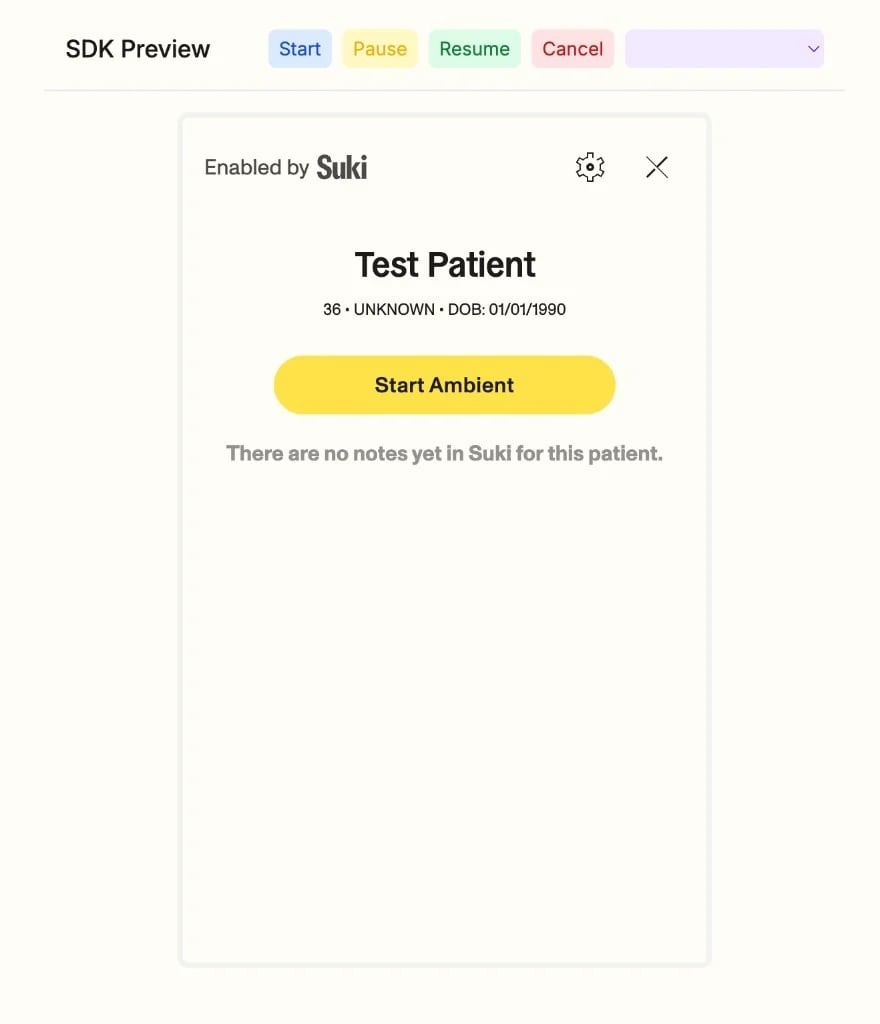
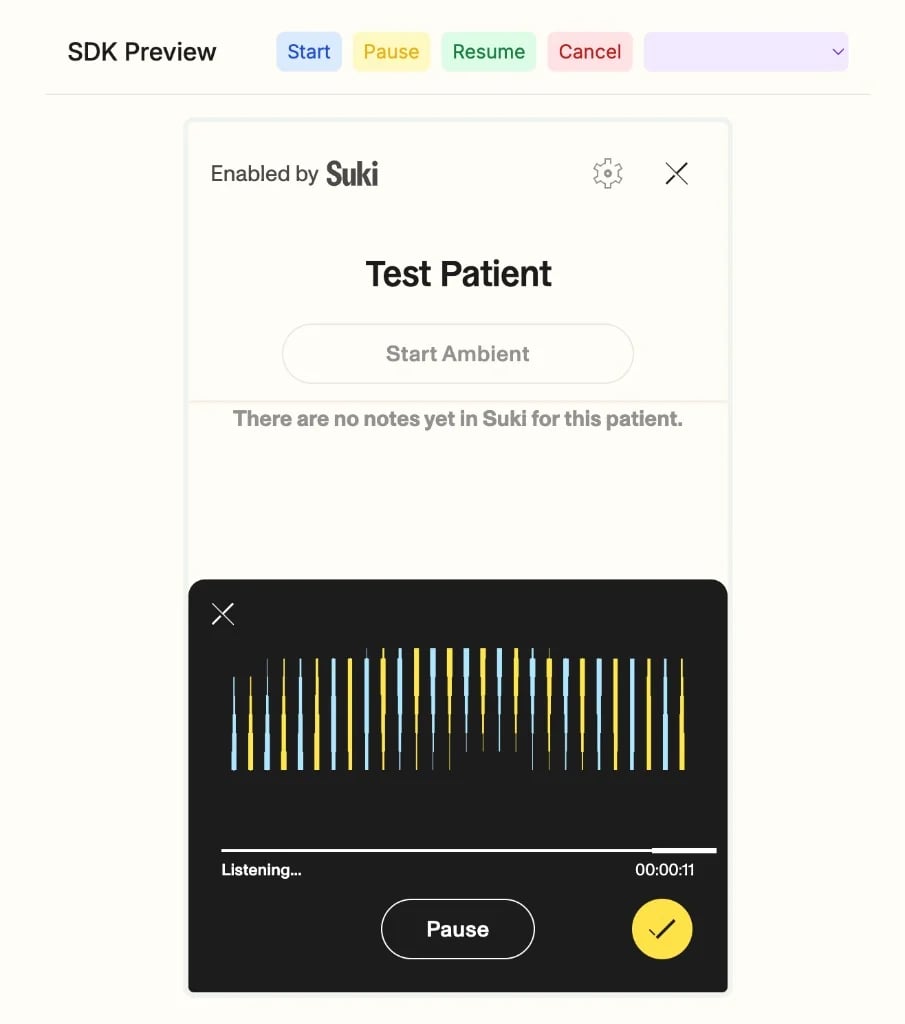
          <div className="hp-io-popular-preview" aria-label="SDK Preview: Start Ambient and listening state">
            <div className="hp-io-popular-preview-slot">
              <img src="https://mintcdn.com/suki-1e08f176/JWCBr7FDuYx75ifb/documentation/assets/hp-mp-sdk-light.webp?fit=max&auto=format&n=JWCBr7FDuYx75ifb&q=85&s=5b83ccceb785826ac0d045405160904d" alt="SDK Preview with Start Ambient" className="hp-io-popular-preview-img" width={880} height={1024} loading="eager" decoding="async" data-path="documentation/assets/hp-mp-sdk-light.webp" />
            </div>

            <div className="hp-io-popular-preview-slot">
              <img src="https://mintcdn.com/suki-1e08f176/JWCBr7FDuYx75ifb/documentation/assets/hp-mp-sdk-dark.webp?fit=max&auto=format&n=JWCBr7FDuYx75ifb&q=85&s=da1bac5774e93c7775bafda5641d5887" alt="SDK Preview ambient listening state" className="hp-io-popular-preview-img" width={905} height={1024} loading="eager" decoding="async" data-path="documentation/assets/hp-mp-sdk-dark.webp" />
            </div>
          </div>
        </div>

        <div className="hp-io-panel" data-hp-io-panel="form-filling">
          <img src="https://mintcdn.com/suki-1e08f176/JWCBr7FDuYx75ifb/documentation/assets/hp-io-form-filling-light.svg?fit=max&auto=format&n=JWCBr7FDuYx75ifb&q=85&s=82cef6dfca675642d2a134ad503b095d" alt="Diagram: form template, form filling session, and structured field output" className="hp-io-img hp-io-img--light" width={800} height={480} loading="eager" decoding="async" data-path="documentation/assets/hp-io-form-filling-light.svg" />

          <img src="https://mintcdn.com/suki-1e08f176/JWCBr7FDuYx75ifb/documentation/assets/hp-io-form-filling-dark.svg?fit=max&auto=format&n=JWCBr7FDuYx75ifb&q=85&s=1e835eee5e72943353ddaf1a8518b374" alt="Diagram: form template, form filling session, and structured field output" className="hp-io-img hp-io-img--dark" width={800} height={480} loading="eager" decoding="async" data-path="documentation/assets/hp-io-form-filling-dark.svg" />
        </div>

        <div className="hp-io-panel" data-hp-io-panel="api">
          <div className="hp-hero-code-custom" data-hp-hero-code aria-label="Ambient session status API examples">
            <div className="hp-hero-code-tabbar" role="tablist" aria-orientation="horizontal">
              <button type="button" className="hp-hero-code-tab is-active" role="tab" id="hp-io-am-tab-typescript" aria-selected="true" aria-controls="hp-io-am-panel-typescript" data-hp-hero-tab="typescript" tabIndex={0}>
                <span className="hp-hero-code-tab-lead" aria-hidden="true">
                  <span className="hp-hero-code-tab-check-wrap">
                    <svg className="hp-hero-code-tab-check" xmlns="http://www.w3.org/2000/svg" width="14" height="14" viewBox="0 0 24 24" fill="none" stroke="currentColor" strokeWidth="2.5" strokeLinecap="round" strokeLinejoin="round">
                      <path d="M20 6 9 17l-5-5" />
                    </svg>
                  </span>

                  <span className="hp-hero-code-tab-icon hp-hero-code-tab-icon--typescript" aria-hidden="true">
                    <svg className="hp-hero-code-lang-svg" xmlns="http://www.w3.org/2000/svg" width="16" height="16" viewBox="0 0 24 24" aria-hidden="true" role="img">
                      <path fill="currentColor" d="M1.125 0C.502 0 0 .502 0 1.125v21.75C0 23.498.502 24 1.125 24h21.75c.623 0 1.125-.502 1.125-1.125V1.125C24 .502 23.498 0 22.875 0zm17.363 9.75c.612 0 1.154.037 1.627.111a6.38 6.38 0 0 1 1.306.34v2.458a3.95 3.95 0 0 0-.643-.361 5.093 5.093 0 0 0-.717-.26 5.453 5.453 0 0 0-1.426-.2c-.3 0-.573.028-.819.086a2.1 2.1 0 0 0-.623.242c-.17.104-.3.229-.393.374a.888.888 0 0 0-.14.49c0 .196.053.373.156.529.104.156.252.304.443.444s.423.276.696.41c.273.135.582.274.926.416.47.197.892.407 1.266.628.374.222.695.473.963.753.268.279.472.598.614.957.142.359.214.776.214 1.253 0 .657-.125 1.21-.373 1.656a3.033 3.033 0 0 1-1.012 1.085 4.38 4.38 0 0 1-1.487.596c-.566.12-1.163.18-1.79.18a9.916 9.916 0 0 1-1.84-.164 5.544 5.544 0 0 1-1.512-.493v-2.63a5.033 5.033 0 0 0 3.237 1.2c.333 0 .624-.03.872-.09.249-.06.456-.144.623-.25.166-.108.29-.234.373-.38a1.023 1.023 0 0 0-.074-1.089 2.12 2.12 0 0 0-.537-.5 5.597 5.597 0 0 0-.807-.444 27.72 27.72 0 0 0-1.007-.436c-.918-.383-1.602-.852-2.053-1.405-.45-.553-.676-1.222-.676-2.005 0-.614.123-1.141.369-1.582.246-.441.58-.804 1.004-1.089a4.494 4.494 0 0 1 1.47-.629 7.536 7.536 0 0 1 1.77-.201zm-15.113.188h9.563v2.166H9.506v9.646H6.789v-9.646H3.375z" />
                    </svg>
                  </span>
                </span>

                <span className="hp-hero-code-tab-label">TypeScript</span>
              </button>

              <button type="button" className="hp-hero-code-tab" role="tab" id="hp-io-am-tab-python" aria-selected="false" aria-controls="hp-io-am-panel-python" data-hp-hero-tab="python" tabIndex={-1}>
                <span className="hp-hero-code-tab-lead" aria-hidden="true">
                  <span className="hp-hero-code-tab-check-wrap">
                    <svg className="hp-hero-code-tab-check" xmlns="http://www.w3.org/2000/svg" width="14" height="14" viewBox="0 0 24 24" fill="none" stroke="currentColor" strokeWidth="2.5" strokeLinecap="round" strokeLinejoin="round">
                      <path d="M20 6 9 17l-5-5" />
                    </svg>
                  </span>

                  <span className="hp-hero-code-tab-icon hp-hero-code-tab-icon--python" aria-hidden="true">
                    <svg className="hp-hero-code-lang-svg" xmlns="http://www.w3.org/2000/svg" width="16" height="16" viewBox="0 0 24 24" aria-hidden="true" role="img">
                      <path fill="currentColor" d="M14.25.18l.9.2.73.26.59.3.45.32.34.34.25.34.16.33.1.3.04.26.02.2-.01.13V8.5l-.05.63-.13.55-.21.46-.26.38-.3.31-.33.25-.35.19-.35.14-.33.1-.3.07-.26.04-.21.02H8.77l-.69.05-.59.14-.5.22-.41.27-.33.32-.27.35-.2.36-.15.37-.1.35-.07.32-.04.27-.02.21v3.06H3.17l-.21-.03-.28-.07-.32-.12-.35-.18-.36-.26-.36-.36-.35-.46-.32-.59-.28-.73-.21-.88-.14-1.05-.05-1.23.06-1.22.16-1.04.24-.87.32-.71.36-.57.4-.44.42-.33.42-.24.4-.16.36-.1.32-.05.24-.01h.16l.06.01h8.16v-.83H6.18l-.01-2.75-.02-.37.05-.34.11-.31.17-.28.25-.26.31-.23.38-.2.44-.18.51-.15.58-.12.64-.1.71-.06.77-.04.84-.02 1.27.05zm-6.3 1.98l-.23.33-.08.41.08.41.23.34.33.22.41.09.41-.09.33-.22.23-.34.08-.41-.08-.41-.23-.33-.33-.22-.41-.09-.41.09zm13.09 3.95l.28.06.32.12.35.18.36.27.36.35.35.47.32.59.28.73.21.88.14 1.04.05 1.23-.06 1.23-.16 1.04-.24.86-.32.71-.36.57-.4.45-.42.33-.42.24-.4.16-.36.09-.32.05-.24.02-.16-.01h-8.22v.82h5.84l.01 2.76.02.36-.05.34-.11.31-.17.29-.25.25-.31.24-.38.2-.44.17-.51.15-.58.13-.64.09-.71.07-.77.04-.84.01-1.27-.04-1.07-.14-.9-.2-.73-.25-.59-.3-.45-.33-.34-.34-.25-.34-.16-.33-.1-.3-.04-.25-.02-.2.01-.13v-5.34l.05-.64.13-.54.21-.46.26-.38.3-.32.33-.24.35-.2.35-.14.33-.1.3-.06.26-.04.21-.02.13-.01h5.84l.69-.05.59-.14.5-.21.41-.28.33-.32.27-.35.2-.36.15-.36.1-.35.07-.32.04-.28.02-.21V6.07h2.09l.14.01zm-6.47 14.25l-.23.33-.08.41.08.41.23.33.33.23.41.08.41-.08.33-.23.23-.33.08-.41-.08-.41-.23-.33-.33-.23-.41-.08-.41.08z" />
                    </svg>
                  </span>
                </span>

                <span className="hp-hero-code-tab-label">Python</span>
              </button>

              <button type="button" className="hp-hero-code-tab" role="tab" id="hp-io-am-tab-go" aria-selected="false" aria-controls="hp-io-am-panel-go" data-hp-hero-tab="go" tabIndex={-1}>
                <span className="hp-hero-code-tab-lead" aria-hidden="true">
                  <span className="hp-hero-code-tab-check-wrap">
                    <svg className="hp-hero-code-tab-check" xmlns="http://www.w3.org/2000/svg" width="14" height="14" viewBox="0 0 24 24" fill="none" stroke="currentColor" strokeWidth="2.5" strokeLinecap="round" strokeLinejoin="round">
                      <path d="M20 6 9 17l-5-5" />
                    </svg>
                  </span>

                  <span className="hp-hero-code-tab-icon hp-hero-code-tab-icon--go" aria-hidden="true">
                    <svg className="hp-hero-code-lang-svg" xmlns="http://www.w3.org/2000/svg" width="16" height="16" viewBox="0 0 24 24" aria-hidden="true" role="img">
                      <path fill="currentColor" d="M1.811 10.231c-.047 0-.058-.023-.035-.059l.246-.315c.023-.035.081-.058.128-.058h4.172c.046 0 .058.035.035.07l-.199.303c-.023.036-.082.07-.117.07zM.047 11.306c-.047 0-.059-.023-.035-.058l.245-.316c.023-.035.082-.058.129-.058h5.328c.047 0 .07.035.058.07l-.093.28c-.012.047-.058.07-.105.07zm2.828 1.075c-.047 0-.059-.035-.035-.07l.163-.292c.023-.035.07-.07.117-.07h2.337c.047 0 .07.035.07.082l-.023.28c0 .047-.047.082-.082.082zm12.129-2.36c-.736.187-1.239.327-1.963.514-.176.046-.187.058-.34-.117-.174-.199-.303-.327-.548-.444-.737-.362-1.45-.257-2.115.175-.795.514-1.204 1.274-1.192 2.22.011.935.654 1.706 1.577 1.835.795.105 1.46-.175 1.987-.77.105-.13.198-.27.315-.434H10.47c-.245 0-.304-.152-.222-.35.152-.362.432-.97.596-1.274a.315.315 0 01.292-.187h4.253c-.023.316-.023.631-.07.947a4.983 4.983 0 01-.958 2.29c-.841 1.11-1.94 1.8-3.33 1.986-1.145.152-2.209-.07-3.143-.77-.865-.655-1.356-1.52-1.484-2.595-.152-1.274.222-2.419.993-3.424.83-1.086 1.928-1.776 3.272-2.02 1.098-.2 2.15-.07 3.096.571.62.41 1.063.97 1.356 1.648.07.105.023.164-.117.2m3.868 6.461c-1.064-.024-2.034-.328-2.852-1.029a3.665 3.665 0 01-1.262-2.255c-.21-1.32.152-2.489.947-3.529.853-1.122 1.881-1.706 3.272-1.95 1.192-.21 2.314-.095 3.33.595.923.63 1.496 1.484 1.648 2.605.198 1.578-.257 2.863-1.344 3.962-.771.783-1.718 1.273-2.805 1.495-.315.06-.63.07-.934.106zm2.78-4.72c-.011-.153-.011-.27-.034-.387-.21-1.157-1.274-1.81-2.384-1.554-1.087.245-1.788.935-2.045 2.033-.21.912.234 1.835 1.075 2.21.643.28 1.285.244 1.905-.07.923-.48 1.425-1.228 1.484-2.233z" />
                    </svg>
                  </span>
                </span>

                <span className="hp-hero-code-tab-label">Go</span>
              </button>

              <button type="button" className="hp-hero-code-tab" role="tab" id="hp-io-am-tab-ruby" aria-selected="false" aria-controls="hp-io-am-panel-ruby" data-hp-hero-tab="ruby" tabIndex={-1}>
                <span className="hp-hero-code-tab-lead" aria-hidden="true">
                  <span className="hp-hero-code-tab-check-wrap">
                    <svg className="hp-hero-code-tab-check" xmlns="http://www.w3.org/2000/svg" width="14" height="14" viewBox="0 0 24 24" fill="none" stroke="currentColor" strokeWidth="2.5" strokeLinecap="round" strokeLinejoin="round">
                      <path d="M20 6 9 17l-5-5" />
                    </svg>
                  </span>

                  <span className="hp-hero-code-tab-icon hp-hero-code-tab-icon--ruby" aria-hidden="true">
                    <svg className="hp-hero-code-lang-svg" xmlns="http://www.w3.org/2000/svg" width="16" height="16" viewBox="0 0 24 24" aria-hidden="true" role="img">
                      <path fill="currentColor" d="M20.156.083c3.033.525 3.893 2.598 3.829 4.77L24 4.822 22.635 22.71 4.89 23.926h.016C3.433 23.864.15 23.729 0 19.139l1.645-3 2.819 6.586.503 1.172 2.805-9.144-.03.007.016-.03 9.255 2.956-1.396-5.431-.99-3.9 8.82-.569-.615-.51L16.5 2.114 20.159.073l-.003.01zM0 19.089zM5.13 5.073c3.561-3.533 8.157-5.621 9.922-3.84 1.762 1.777-.105 6.105-3.673 9.636-3.563 3.532-8.103 5.734-9.864 3.957-1.766-1.777.045-6.217 3.612-9.75l.003-.003z" />
                    </svg>
                  </span>
                </span>

                <span className="hp-hero-code-tab-label">Ruby</span>
              </button>

              <button type="button" className="hp-hero-code-tab" role="tab" id="hp-io-am-tab-curl" aria-selected="false" aria-controls="hp-io-am-panel-curl" data-hp-hero-tab="curl" tabIndex={-1}>
                <span className="hp-hero-code-tab-lead" aria-hidden="true">
                  <span className="hp-hero-code-tab-check-wrap">
                    <svg className="hp-hero-code-tab-check" xmlns="http://www.w3.org/2000/svg" width="14" height="14" viewBox="0 0 24 24" fill="none" stroke="currentColor" strokeWidth="2.5" strokeLinecap="round" strokeLinejoin="round">
                      <path d="M20 6 9 17l-5-5" />
                    </svg>
                  </span>

                  <span className="hp-hero-code-tab-icon hp-hero-code-tab-icon--curl" aria-hidden="true">
                    <svg className="hp-hero-code-lang-svg" xmlns="http://www.w3.org/2000/svg" width="16" height="16" viewBox="0 0 24 24" aria-hidden="true" role="img">
                      <path fill="currentColor" d="M.803 14.8169c0-.5342.433-.9665.9665-.9665.5335 0 .9665.4323.9665.9665 0 .5335-.433.9657-.9665.9657-.5335 0-.9666-.4322-.9666-.9657m2.736 0c0-.1963-.0532-.376-.1119-.5525-.2344-.7024-.876-1.2169-1.6575-1.2169-.1249 0-.2344.0465-.3524.0708C.6149 13.2865 0 13.9646 0 14.817c0 .9764.7923 1.7694 1.7695 1.7694.9772 0 1.7694-.793 1.7694-1.7694m-1.7694-7.149c.5335 0 .9665.433.9665.9665 0 .5335-.433.9665-.9665.9665-.5343 0-.9666-.433-.9666-.9665 0-.5335.4323-.9665.9666-.9665m0 2.7359c.9772 0 1.7694-.7923 1.7694-1.7694 0-.1956-.0532-.376-.1119-.5525-.2344-.7024-.8767-1.2169-1.6575-1.2169-.1249 0-.2344.0465-.3524.0716C.6149 7.104 0 7.782 0 8.6344c0 .9771.7923 1.7694 1.7695 1.7694m13.221-5.694c-.5342 0-.9665-.433-.9665-.9664a.966.966 0 01.9666-.9665c.5335 0 .9658.4322.9658.9665 0 .5334-.4323.9664-.9658.9664m-9.6 16.5133c-.5335 0-.9666-.433-.9666-.9665 0-.5342.433-.9665.9666-.9665a.966.966 0 01.9665.9665c0 .5335-.4323.9665-.9665.9665m9.6-19.2491c-.978 0-1.7695.7922-1.7695 1.7694 0 .2085.0525.4025.1187.5882L5.039 18.5581c-.803.1681-1.4179.8462-1.4179 1.6985 0 .9772.7923 1.7694 1.7695 1.7694.9772 0 1.7694-.7922 1.7694-1.7694 0-.1963-.0525-.3759-.111-.5525l8.3427-14.2728c.7778-.1865 1.3683-.8531 1.3683-1.688 0-.977-.793-1.7693-1.7694-1.7693m7.24 2.7359c-.5343 0-.9666-.433-.9666-.9665a.966.966 0 01.9665-.9665c.5335 0 .9666.4322.9666.9665 0 .5334-.433.9665-.9666.9665M12.6313 21.223c-.5343 0-.9665-.433-.9665-.9665a.966.966 0 01.9665-.9665c.5335 0 .9658.4323.9658.9665 0 .5335-.4323.9665-.9658.9665M22.2305 1.974c-.9772 0-1.7694.7922-1.7694 1.7694 0 .2085.0525.4025.1187.5882l-8.3009 14.2265c-.8021.1681-1.417.8462-1.417 1.6985 0 .9772.7922 1.7694 1.7694 1.7694.9764 0 1.7687-.7922 1.7687-1.7694 0-.1963-.0525-.3759-.1111-.5525l8.3427-14.2728C23.4094 5.2448 24 4.5782 24 3.7433c0-.977-.7923-1.7693-1.7695-1.7693" />
                    </svg>
                  </span>
                </span>

                <span className="hp-hero-code-tab-label">cURL</span>
              </button>
            </div>

            <div className="hp-hero-code-panels">
              <div className="hp-hero-code-panel is-active" id="hp-io-am-panel-typescript" role="tabpanel" aria-labelledby="hp-io-am-tab-typescript" data-hp-hero-panel="typescript">
                ```typescript theme={"theme":{"light":"github-dark","dark":"material-theme-darker"}}
                const sessionId = '{ambient_session_id}';
                const res = await fetch(
                  `https://sdp.suki-stage.com/api/v1/ambient/session/${sessionId}/status`,
                  { headers: { sdp_suki_token: '<sdp_suki_token>', sdp_provider_id: '<sdp_provider_id>' } }
                );
                console.log(res.status, await res.json());
                ```
              </div>

              <div className="hp-hero-code-panel" hidden id="hp-io-am-panel-python" role="tabpanel" aria-labelledby="hp-io-am-tab-python" data-hp-hero-panel="python">
                ```python theme={"theme":{"light":"github-dark","dark":"material-theme-darker"}}
                import requests

                session_id = "{ambient_session_id}"
                url = f"https://sdp.suki-stage.com/api/v1/ambient/session/{session_id}/status"
                headers = {"sdp_suki_token": "<sdp_suki_token>", "sdp_provider_id": "<sdp_provider_id>"}
                r = requests.get(url, headers=headers)
                print(r.status_code, r.json())
                ```
              </div>

              <div className="hp-hero-code-panel" hidden id="hp-io-am-panel-go" role="tabpanel" aria-labelledby="hp-io-am-tab-go" data-hp-hero-panel="go">
                ```go theme={"theme":{"light":"github-dark","dark":"material-theme-darker"}}
                package main

                import (
                	"fmt"
                	"io"
                	"net/http"
                )

                func main() {
                	url := "https://sdp.suki-stage.com/api/v1/ambient/session/{ambient_session_id}/status"
                	req, _ := http.NewRequest(http.MethodGet, url, nil)
                	req.Header.Set("sdp_suki_token", "<sdp_suki_token>")
                	req.Header.Set("sdp_provider_id", "<sdp_provider_id>")
                	res, _ := http.DefaultClient.Do(req)
                	defer res.Body.Close()
                	b, _ := io.ReadAll(res.Body)
                	fmt.Println(res.StatusCode, string(b))
                }
                ```
              </div>

              <div className="hp-hero-code-panel" hidden id="hp-io-am-panel-ruby" role="tabpanel" aria-labelledby="hp-io-am-tab-ruby" data-hp-hero-panel="ruby">
                ```ruby theme={"theme":{"light":"github-dark","dark":"material-theme-darker"}}
                require "net/http"

                uri = URI("https://sdp.suki-stage.com/api/v1/ambient/session/{ambient_session_id}/status")
                req = Net::HTTP::Get.new(uri)
                req["sdp_suki_token"] = "<sdp_suki_token>"
                req["sdp_provider_id"] = "<sdp_provider_id>"
                res = Net::HTTP.start(uri.hostname, uri.port, use_ssl: true) { |h| h.request(req) }
                puts res.code
                puts res.body
                ```
              </div>

              <div className="hp-hero-code-panel" hidden id="hp-io-am-panel-curl" role="tabpanel" aria-labelledby="hp-io-am-tab-curl" data-hp-hero-panel="curl">
                ```bash theme={"theme":{"light":"github-dark","dark":"material-theme-darker"}}
                curl --request GET \
                  --url https://sdp.suki-stage.com/api/v1/ambient/session/{ambient_session_id}/status \
                  --header 'sdp_suki_token: <sdp_suki_token>' \
                  --header 'sdp_provider_id: <sdp_provider_id>'
                ```
              </div>
            </div>
          </div>
        </div>

        <div className="hp-io-panel" data-hp-io-panel="mobile">
          <img src="https://mintcdn.com/suki-1e08f176/8ZbqOHQ5xwHlf7Ms/documentation/assets/hp-io-mobile-light.svg?fit=max&auto=format&n=8ZbqOHQ5xwHlf7Ms&q=85&s=51468afad7b4417d072354f04dc006a9" alt="Diagram: Swift Mobile SDK on iOS" className="hp-io-img hp-io-img--light" width={800} height={480} loading="eager" decoding="async" data-path="documentation/assets/hp-io-mobile-light.svg" />

          <img src="https://mintcdn.com/suki-1e08f176/8ZbqOHQ5xwHlf7Ms/documentation/assets/hp-io-mobile-dark.svg?fit=max&auto=format&n=8ZbqOHQ5xwHlf7Ms&q=85&s=f02c4f73c06580ba559630b7bbe70a46" alt="Diagram: Swift Mobile SDK on iOS" className="hp-io-img hp-io-img--dark" width={800} height={480} loading="eager" decoding="async" data-path="documentation/assets/hp-io-mobile-dark.svg" />
        </div>

        <div className="hp-io-panel" data-hp-io-panel="web">
          <img src="https://mintcdn.com/suki-1e08f176/8ZbqOHQ5xwHlf7Ms/documentation/assets/hp-io-web-light.svg?fit=max&auto=format&n=8ZbqOHQ5xwHlf7Ms&q=85&s=615eeb677a180654dd21f1a2e232ae2c" alt="Diagram: headed Web SDK with pre-built UI" className="hp-io-img hp-io-img--light" width={800} height={480} loading="eager" decoding="async" data-path="documentation/assets/hp-io-web-light.svg" />

          <img src="https://mintcdn.com/suki-1e08f176/8ZbqOHQ5xwHlf7Ms/documentation/assets/hp-io-web-dark.svg?fit=max&auto=format&n=8ZbqOHQ5xwHlf7Ms&q=85&s=f9b16f5b64ac7b1d872b4066b26aad8b" alt="Diagram: headed Web SDK with pre-built UI" className="hp-io-img hp-io-img--dark" width={800} height={480} loading="eager" decoding="async" data-path="documentation/assets/hp-io-web-dark.svg" />
        </div>

        <div className="hp-io-panel" data-hp-io-panel="headless">
          <img src="https://mintcdn.com/suki-1e08f176/8ZbqOHQ5xwHlf7Ms/documentation/assets/hp-io-headless-light.svg?fit=max&auto=format&n=8ZbqOHQ5xwHlf7Ms&q=85&s=fc0222ec1a8d96a91ba3f62a77080706" alt="Diagram: headless React SDK and custom UI" className="hp-io-img hp-io-img--light" width={800} height={480} loading="eager" decoding="async" data-path="documentation/assets/hp-io-headless-light.svg" />

          <img src="https://mintcdn.com/suki-1e08f176/8ZbqOHQ5xwHlf7Ms/documentation/assets/hp-io-headless-dark.svg?fit=max&auto=format&n=8ZbqOHQ5xwHlf7Ms&q=85&s=34d0c7396c471af0acacdc38aae26693" alt="Diagram: headless React SDK and custom UI" className="hp-io-img hp-io-img--dark" width={800} height={480} loading="eager" decoding="async" data-path="documentation/assets/hp-io-headless-dark.svg" />
        </div>

        <div className="hp-io-panel" data-hp-io-panel="dictation-api">
          <img src="https://mintcdn.com/suki-1e08f176/JWCBr7FDuYx75ifb/documentation/assets/hp-io-dictation-api-light.svg?fit=max&auto=format&n=JWCBr7FDuYx75ifb&q=85&s=a6107f788ff7b44538f932e2c70ce422" alt="Diagram: microphone audio streaming through a dictation API to a live transcript" className="hp-io-img hp-io-img--light" width={800} height={480} loading="eager" decoding="async" data-path="documentation/assets/hp-io-dictation-api-light.svg" />

          <img src="https://mintcdn.com/suki-1e08f176/JWCBr7FDuYx75ifb/documentation/assets/hp-io-dictation-api-dark.svg?fit=max&auto=format&n=JWCBr7FDuYx75ifb&q=85&s=7b1bf49ac7d02844a1fd1a850a8d80d5" alt="Diagram: microphone audio streaming through a dictation API to a live transcript" className="hp-io-img hp-io-img--dark" width={800} height={480} loading="eager" decoding="async" data-path="documentation/assets/hp-io-dictation-api-dark.svg" />
        </div>

        <div className="hp-io-panel" data-hp-io-panel="dictation-sdk">
          <img src="https://mintcdn.com/suki-1e08f176/JWCBr7FDuYx75ifb/documentation/assets/hp-io-dictation-sdk-light.svg?fit=max&auto=format&n=JWCBr7FDuYx75ifb&q=85&s=fafc542800183fce85b4616672608421" alt="Diagram: browser with embedded Dictation SDK microphone producing a transcript" className="hp-io-img hp-io-img--light" width={800} height={480} loading="eager" decoding="async" data-path="documentation/assets/hp-io-dictation-sdk-light.svg" />

          <img src="https://mintcdn.com/suki-1e08f176/JWCBr7FDuYx75ifb/documentation/assets/hp-io-dictation-sdk-dark.svg?fit=max&auto=format&n=JWCBr7FDuYx75ifb&q=85&s=b1e5ff715b99ec9e6e3386e80862abc4" alt="Diagram: browser with embedded Dictation SDK microphone producing a transcript" className="hp-io-img hp-io-img--dark" width={800} height={480} loading="eager" decoding="async" data-path="documentation/assets/hp-io-dictation-sdk-dark.svg" />
        </div>
      </div>
    </div>
  </div>

  <div className="hp-journey-explore" aria-labelledby="hp-journey-explore-title">
    <div className="hp-journey-explore-intro">
      <p className="hp-journey-eyebrow hp-journey-eyebrow--explore">Explore the popular docs</p>

      <h2 id="hp-journey-explore-title" className="hp-journey-title hp-journey-title--explore">
        Start here
      </h2>

      <p className="hp-journey-lead hp-journey-lead--explore" style={{ fontSize: '16px' }}>
        Learn how Suki for Partners fits into your product. Explore guides on common use cases, integration paths, and go live faster.
      </p>
    </div>

    <div className="hp-home-features hp-home-features--graphic-links">
      <a href="/documentation/overview" className="hp-home-feature-graphic-link" aria-label="Platform Overview: Suki APIs and SDKs power Ambient, Dictation and Documentation intelligence">
        <img draggable={false} src="https://mintcdn.com/suki-1e08f176/xvgkVacrhwSW52ta/documentation/assets/home-heroes/overview-graphic.png?fit=max&auto=format&n=xvgkVacrhwSW52ta&q=85&s=e1980d28ffab56ed070771ace95fc313" alt="Platform Overview: Suki APIs and SDKs power Ambient, Dictation and Documentation intelligence across your application" width={1024} height={560} loading="eager" decoding="async" noZoom data-path="documentation/assets/home-heroes/overview-graphic.png" />
      </a>

      <a href="/documentation/workflows" className="hp-home-feature-graphic-link" aria-label="Seamless Integration: integrate in minutes with simple APIs and SDKs">
        <img draggable={false} src="https://mintcdn.com/suki-1e08f176/xvgkVacrhwSW52ta/documentation/assets/home-heroes/integration-graphic.png?fit=max&auto=format&n=xvgkVacrhwSW52ta&q=85&s=c467edf0121e7bc20c923354ed1bbbb9" alt="Seamless Integration: integrate in minutes with simple APIs and SDKs. Built for speed, designed for flexibility" width={1024} height={560} loading="eager" decoding="async" noZoom data-path="documentation/assets/home-heroes/integration-graphic.png" />
      </a>

      <a href="/documentation/learning-path" className="hp-home-feature-graphic-link" aria-label="Developer Journey: from quickstart to production">
        <img draggable={false} src="https://mintcdn.com/suki-1e08f176/xvgkVacrhwSW52ta/documentation/assets/home-heroes/journey-graphic.png?fit=max&auto=format&n=xvgkVacrhwSW52ta&q=85&s=d0478d9616eafea1f9b3cc3a048b58d4" alt="Developer Journey: from quickstart to production, we support you every step of the way" width={1024} height={560} loading="eager" decoding="async" noZoom data-path="documentation/assets/home-heroes/journey-graphic.png" />
      </a>
    </div>
  </div>

  <div className="hp-home-footer-stack">
    <div className="hp-leader-banner">
      <div className="hp-leader-banner-inner">
        <div className="hp-leader-banner-copy">
          <p className="hp-leader-banner-line1">
            <span className="hp-leader-banner-icon" aria-hidden="true">
              👋
            </span>

            New to Suki for Partners?
          </p>

          <p className="hp-leader-banner-line2">
            Understand the product, value, and integration approach before you start building.
          </p>
        </div>

        <a href="/documentation/executive-summary" className="hp-cta hp-cta-primary hp-cta-with-icon hp-leader-banner-cta" aria-label="Open executive summary for business leaders">
          Executive Summary

          <span className="hp-cta-icon hp-cta-icon-arrow-text" aria-hidden="true">
            →
          </span>
        </a>
      </div>
    </div>

    <div className="hp-journey-explore hp-journey-explore--wn" aria-labelledby="hp-journey-wn-title">
      <div className="hp-journey-wn-head">
        <div className="hp-journey-explore-intro">
          <p className="hp-journey-eyebrow hp-journey-eyebrow--explore">Latest releases</p>

          <h2 id="hp-journey-wn-title" className="hp-journey-title hp-journey-title--explore">
            What's new
          </h2>

          <p className="hp-journey-lead hp-journey-lead--explore" style={{ fontSize: '16px' }}>
            Explore new APIs, SDKs, and features recently added to Suki for Partners.
          </p>
        </div>
      </div>

      <div className="hp-wn">
        <div className="hp-wn-list">
          <a href="/updates/mar2026-release-notes" className="hp-wn-item" aria-label="Audio Dictation APIs: Dictation APIs to transcribe audio in real-time">
            <span className="hp-wn-badge hp-wn-badge-new">New</span>

            <span className="hp-wn-copy">
              <span className="hp-wn-title">Audio Dictation APIs</span>
              <span className="hp-wn-desc">Dictation APIs to transcribe audio in real-time</span>
            </span>

            <span className="hp-wn-chevron" aria-hidden="true">›</span>
          </a>

          <a href="/headless-web-sdk/introduction" className="hp-wn-item" aria-label="Headless Web SDK: New beta headless SDK for building custom ambient integrations with full UI control">
            <span className="hp-wn-badge hp-wn-badge-beta">Beta</span>

            <span className="hp-wn-copy">
              <span className="hp-wn-title">Headless Web SDK</span>
              <span className="hp-wn-desc">New beta headless SDK for building custom ambient integrations with full UI control</span>
            </span>

            <span className="hp-wn-chevron" aria-hidden="true">›</span>
          </a>

          <a href="/dictation-sdk/introduction" className="hp-wn-item" aria-label="Dictation SDK: New beta dictation SDK for embedding clinical dictation in the browser">
            <span className="hp-wn-badge hp-wn-badge-beta">Beta</span>

            <span className="hp-wn-copy">
              <span className="hp-wn-title">Dictation SDK</span>
              <span className="hp-wn-desc">New beta dictation SDK for embedding clinical dictation in the browser</span>
            </span>

            <span className="hp-wn-chevron" aria-hidden="true">›</span>
          </a>

          <a href="/form-filling-api-reference/overview" className="hp-wn-item" aria-label="Form Filling APIs: New form filling APIs for creating form filling sessions and retrieving structured field data">
            <span className="hp-wn-badge hp-wn-badge-new">New</span>

            <span className="hp-wn-copy">
              <span className="hp-wn-title">Form Filling APIs</span>
              <span className="hp-wn-desc">New form filling APIs for creating form filling sessions and retrieving structured field data</span>
            </span>

            <span className="hp-wn-chevron" aria-hidden="true">›</span>
          </a>
        </div>
      </div>

      <div className="hp-wn-cta-row">
        <div className="hp-wn-cta-spacer" aria-hidden="true" />

        <a href="/updates/release-notes" className="hp-wn-all">View Release Notes →</a>
      </div>
    </div>
  </div>
</div>