> ## Documentation Index
> Fetch the complete documentation index at: https://developer.suki.ai/llms.txt
> Use this file to discover all available pages before exploring further.
# April 2026
> April 2026 release notes for Suki APIs and SDKs
This release adds the **Dictation SDK (beta)** for clinical dictation in the browser with a hosted iframe, **in-field** and **scratchpad** modes,
and JavaScript or React callbacks for transcripts. For the **Web SDK**, we've shipped **SukiAuthManager** and **@suki-sdk/core** for authentication, plus
optional visit and provider fields in `ambientOptions` so sessions carry more context, notes read better in the UI, and the patient note list can show **visit type** as the title instead of **Note** on every row.
For the **Mobile SDK**, we've added optional **orders info**
for medications and **EMR info** for ambient sessions. For the **API**, new **info** endpoints return supported
values for medication coding systems, dosage units, encounter relations, frequencies, medication timings, origins, and statuses.
## What's new
### New features
Dictation SDK v0.1.0
**Dictation SDK (beta)**: First release of the Suki Dictation SDK. Embed clinical dictation in your web app with a hosted iframe, **in-field** mode tied to a text field or **scratchpad** mode for a floating surface, and JavaScript or React integration. You control how users start dictation; the SDK returns transcript text through callbacks.
**Why it matters**: Ship browser-based clinical dictation without building the full dictation UI yourself, while keeping your own chrome and workflows.
Learn more in the [Dictation SDK introduction](/dictation-sdk/introduction) documentation and [Changelog](/dictation-sdk/changelog).
API v1.3.0
**New info endpoints**: Added new endpoints to get the list of supported medication coding systems, dosage units, encounter relations, frequencies, medication timings, origins, and statuses.
**Endpoints**:
* GET [/api/v1/info/orders/coding-systems](/api-reference/info/orders-coding-systems) to get the list of supported medication coding systems.
* GET [/api/v1/info/orders/dosage-units](/api-reference/info/orders-dosage-units) to get the list of supported medication dosage units.
* GET [/api/v1/info/orders/encounter-relations](/api-reference/info/orders-encounter-relations) to get the list of supported encounter relations.
* GET [/api/v1/info/orders/frequencies](/api-reference/info/orders-frequencies) to get the list of supported medication frequencies.
* GET [/api/v1/info/orders/medication-timings](/api-reference/info/orders-medication-timings) to get the list of supported medication timings.
* GET [/api/v1/info/orders/origins](/api-reference/info/orders-origins) to get the list of supported medication origins.
* GET [/api/v1/info/orders/statuses](/api-reference/info/orders-statuses) to get the list of supported medication statuses.
**Why it matters**: This allows you to get the list of supported medication coding systems, dosage units, encounter relations, frequencies, medication timings, origins, and statuses.
Learn more in the [Info endpoints](/api-reference/info/orders) reference.
## What's enhanced
### Enhancements
Web SDK v3.0.0 | Breaking changes
**Web SDK new authentication flow**: Sign-in now goes through **SukiAuthManager** from **@suki-sdk/core**, the same model as our other SDKs. Add that core package next to **@suki-sdk/js** or **@suki-sdk/react**, configure partner credentials, staging or production, and provider details on the manager, and pass the manager when you start the Web SDK in JavaScript or React. You no longer rely on putting those fields only on the init call. Pick stage versus production with the manager's environment setting instead of test mode on init options.
**Why it matters**: One auth surface across SDKs, clearer separation between sign-in and UI setup, and explicit environment choice before the hosted experience loads.
Learn more in the [Migrating to Web SDK v3](../web-sdk/product-updates/migration-to-v3) guide.
Web SDK v2.2.0
**Optional session-level metadata**: Pass **visit context** (`visitType`, `encounterType`, `reasonForVisit`, `chiefComplaint`) and **providerRole** in `ambientOptions` to improve note generation. Pass these at session init (e.g. in `mount` or when calling `setAmbientOptions`).
**Why it matters**: Improve note generation accuracy by passing session-level metadata alongside your LOINC sections.
Learn more in the [Ambient implementation](/web-sdk/guides/ambient-implementation) guide and [AmbientOptions](/web-sdk/api-reference/types/ambient-options#properties) reference.
Web SDK v2.2.0
**Custom note titles**: We've updated the Web SDK so the patient note list can show a real title instead of **Note** for every entry.
Set **`visitType`** in **`ambientOptions`** when you start the session (same place you pass the other visit fields). The list uses that value as the note title. If you skip it, behavior stays the same as before.
***
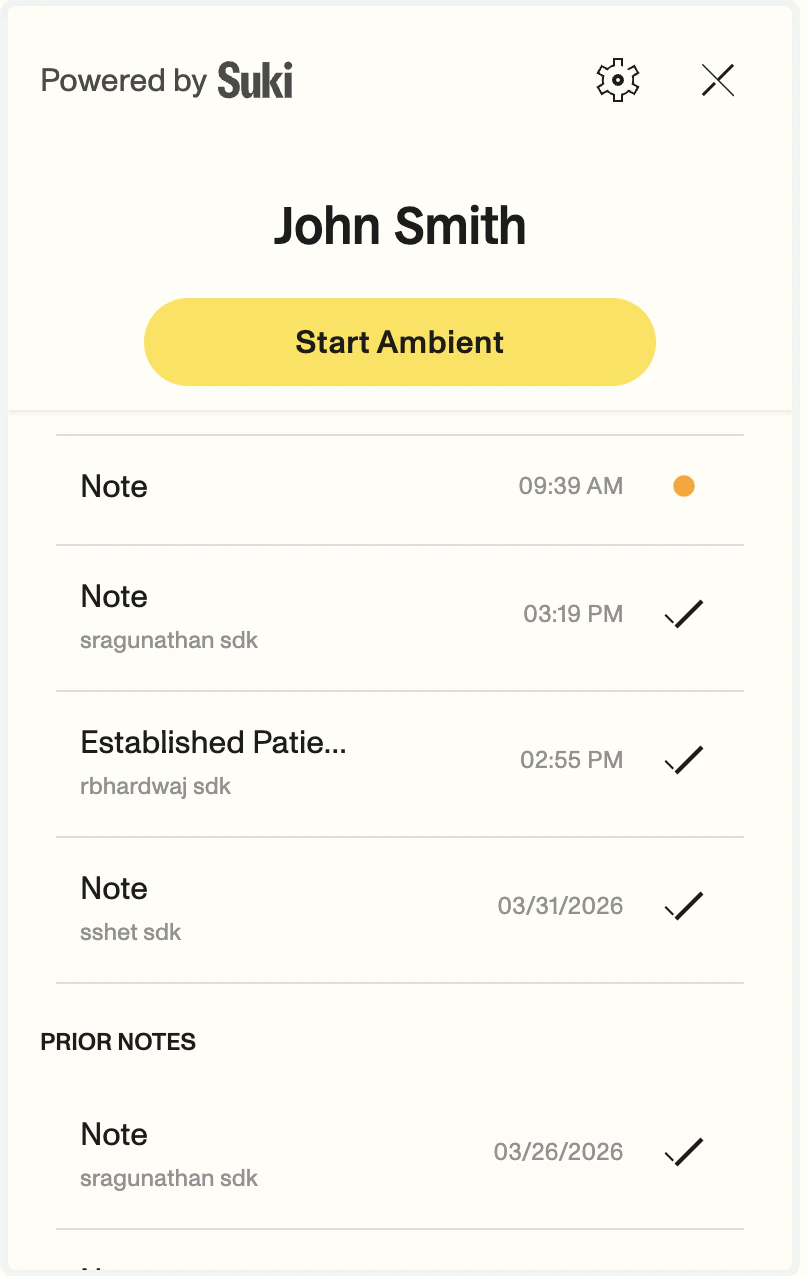 ***
**Why it matters**: When more than one note is created on the same day, clinicians can see labels like **`ESTABLISHED_PATIENT`** or **`WELLNESS`** instead of several rows that all say **Note**.
Learn more in the [Note management](/web-sdk/guides/note-management#note-titles-in-the-web-sdk-ui) guide.
Mobile SDK v2.6.0
**Medication orders in session context**: We have added **optional orders info** for Suki iOS SDK ambient sessions. You can now include medications tied to a visit, such as those from your EHR, while keeping your session creation flow the same.
**Implementation steps:**
To include medication orders, follow these requirements:
* **Method call**: After you create the session, call `setSessionContext(with:)` using the `SukiAmbientConstant.kOrdersInfo` constant.
* **Data structure**: Place each order within the `MedicationOrderKeys.kMedicationOrders` key.
**Why it matters**: Note generation can use medications tied to the visit (for example from your EMR) while your session creation flow stays the same.
Learn more in the [Medication orders](/mobile-sdk/ambient-guides/provide-clinical-context#orders-info) section of the provide clinical context guide.
Mobile SDK v2.6.0
**EMR info in session context**: We have added **optional EMR info** for Suki iOS SDK ambient sessions. You can now include information about the EMR system that applies to the session, such as the vendor code or environment-specific label.
**Implementation steps:**
To include EMR info, follow these requirements:
* **Method call**: After you create the session, call `setSessionContext(with:)` using the `SukiAmbientConstant.kEmrInfo` constant.
* **Data structure**: Place the EMR info within the `SukiAmbientConstant.kEmrInfo` key.
* **Required fields**: The `SukiAmbientConstant.kTargetEmr` key is required with a string identifier for the target EMR.
**Why it matters**: Note generation can use the EMR info to generate notes that are specific to the EMR system.
Learn more in the [EMR info](/mobile-sdk/ambient-guides/provide-clinical-context#emr-info) section of the provide clinical context guide.
API v1.3.0
**Medication order support**: Medication orders are now supported in the API. You can now send and retrieve medication orders for an ambient session and encounter using the following endpoints:
* GET [/api/v1/ambient/session/{ambient_session_id}/structured-data](/api-reference/ambient-content/structured-data)
* GET [/api/v1/ambient/session/{ambient_session_id}/encounter-structured-data](/api-reference/ambient-content/encounter-structured-data)
* POST [/api/v1/ambient/session/{ambient_session_id}/context](/api-reference/ambient-sessions/update-context)
* GET [/api/v1/ambient/session/{ambient_session_id}/content](/api-reference/ambient-content/content)
* GET [/api/v1/ambient/session/{ambient_session_id}/encounter-content](/api-reference/ambient-content/encounter-content)
**Why it matters**: This allows you to send and retrieve medication orders for an ambient session to be used in the note generation process.
Learn more in the [Medication orders](/documentation/medication-orders) documentation and [Changelog](/api-reference/product-updates/changelog).
***
**Why it matters**: When more than one note is created on the same day, clinicians can see labels like **`ESTABLISHED_PATIENT`** or **`WELLNESS`** instead of several rows that all say **Note**.
Learn more in the [Note management](/web-sdk/guides/note-management#note-titles-in-the-web-sdk-ui) guide.
Mobile SDK v2.6.0
**Medication orders in session context**: We have added **optional orders info** for Suki iOS SDK ambient sessions. You can now include medications tied to a visit, such as those from your EHR, while keeping your session creation flow the same.
**Implementation steps:**
To include medication orders, follow these requirements:
* **Method call**: After you create the session, call `setSessionContext(with:)` using the `SukiAmbientConstant.kOrdersInfo` constant.
* **Data structure**: Place each order within the `MedicationOrderKeys.kMedicationOrders` key.
**Why it matters**: Note generation can use medications tied to the visit (for example from your EMR) while your session creation flow stays the same.
Learn more in the [Medication orders](/mobile-sdk/ambient-guides/provide-clinical-context#orders-info) section of the provide clinical context guide.
Mobile SDK v2.6.0
**EMR info in session context**: We have added **optional EMR info** for Suki iOS SDK ambient sessions. You can now include information about the EMR system that applies to the session, such as the vendor code or environment-specific label.
**Implementation steps:**
To include EMR info, follow these requirements:
* **Method call**: After you create the session, call `setSessionContext(with:)` using the `SukiAmbientConstant.kEmrInfo` constant.
* **Data structure**: Place the EMR info within the `SukiAmbientConstant.kEmrInfo` key.
* **Required fields**: The `SukiAmbientConstant.kTargetEmr` key is required with a string identifier for the target EMR.
**Why it matters**: Note generation can use the EMR info to generate notes that are specific to the EMR system.
Learn more in the [EMR info](/mobile-sdk/ambient-guides/provide-clinical-context#emr-info) section of the provide clinical context guide.
API v1.3.0
**Medication order support**: Medication orders are now supported in the API. You can now send and retrieve medication orders for an ambient session and encounter using the following endpoints:
* GET [/api/v1/ambient/session/{ambient_session_id}/structured-data](/api-reference/ambient-content/structured-data)
* GET [/api/v1/ambient/session/{ambient_session_id}/encounter-structured-data](/api-reference/ambient-content/encounter-structured-data)
* POST [/api/v1/ambient/session/{ambient_session_id}/context](/api-reference/ambient-sessions/update-context)
* GET [/api/v1/ambient/session/{ambient_session_id}/content](/api-reference/ambient-content/content)
* GET [/api/v1/ambient/session/{ambient_session_id}/encounter-content](/api-reference/ambient-content/encounter-content)
**Why it matters**: This allows you to send and retrieve medication orders for an ambient session to be used in the note generation process.
Learn more in the [Medication orders](/documentation/medication-orders) documentation and [Changelog](/api-reference/product-updates/changelog).