> ## Documentation Index
> Fetch the complete documentation index at: https://developer.suki.ai/llms.txt
> Use this file to discover all available pages before exploring further.
# Release & Versioning Policy
> Learn how Suki versions APIs and SDKs, where release information is published, and how to plan upgrades and migrations for your integration
Suki provides the clinical intelligence infrastructure used by leading healthcare software providers and
vendors to build applications on top of Suki capabilities. As a trusted partner, we are committed to providing a stable and reliable platform that you can build on with confidence.
This page explains:
* How Suki versions APIs and SDKs
* How changes are labeled and published
* Where to find release information
* How to plan upgrades and migrations
* Why we publish updates this way
## Why we publish updates this way
Many integrations use more than one Suki product, such as ambient workflows, Form filling, dictation, and SDKs. To support that model, Suki publishes updates through two channels:
Cross-product visibility each month: what shipped across ambient, Form filling, dictation, and SDKs, with paths into deeper docs.
Version-level history per product: labels, tags, breaking-change callouts, snippets, and migration pointers. Open each changelog from the Release notes hub.
Together, these channels help you understand:
* What changed
* Whether your integration is affected
* Where to find implementation details
Release notes provide a **workflow-level summary**. Changelogs provide **product-specific technical detail**.
## Versioning
Suki uses **semantic versioning** (SemVer) for SDKs and documented release trains:
For example:
**MAJOR.MINOR.PATCH**
Example: `3.1.0`
| Version segment | Meaning |
| --------------- | ---------------------------------------------------------------------------------------- |
| **Major** | Breaking or incompatible changes that might require migration work or regression testing |
| **Minor** | Backward-compatible features or capabilities |
| **Patch** | Backward-compatible fixes and documentation updates |
### Product versioning
SDKs, including the Web SDK, Mobile SDK, Headless Web SDK, and Dictation SDK, are released as **versioned npm packages**.
A **major** version increase usually indicates that code or configuration changes are required. When applicable, changelog entries include **migration guidance**.
REST APIs include a version segment in the URL when applicable, such as **`v1`**. That pattern applies across Ambient, Dictation, Form filling, and our other REST surfaces.
Current Suki REST APIs are released under **`v1`**.
Changelog release labels, such as `v1.0.0` or `v1.3.0`, represent incremental product releases. They are separate from the API path version. Those releases can include:
* New endpoints
* Optional fields
* Behavior updates
* Bug fixes
Always review the changelog entry for release-specific details. Changelogs are organized by product line:
* [Ambient and Dictation APIs changelog](/api-reference/product-updates/changelog)
* [Form Filling API changelog](/form-filling-api-reference/changelog)
### Breaking and non-breaking changes
Use the following guidance when reviewing API changes.
These changes are typically backward compatible:
* New optional request or response fields
* New endpoints
* Performance improvements
* Documentation clarifications
Review these changes carefully before upgrading:
* New required fields
* Renamed fields
* Removed endpoints or fields
* Stricter validation
* Changed default behavior
* Any update marked as Breaking changes
If a changelog entry identifies a Breaking changes, update clients or configuration **before** adopting the new behavior.
## Where changes are published
| Channel | Purpose |
| ----------------------------------------------------------------------------------------------------- | ------------------------------------------------------------------------------------------ |
| [Release notes](/updates/release-notes) | Monthly summaries across workflows such as ambient, Form filling, and dictation |
| [Deprecations overview](/updates/deprecations-overview) and [Deprecation list](/updates/deprecations) | How deprecations work at Suki and a searchable catalog of active deprecations and removals |
| [Announcements](/updates/announcements) | Site-wide notices and operational updates |
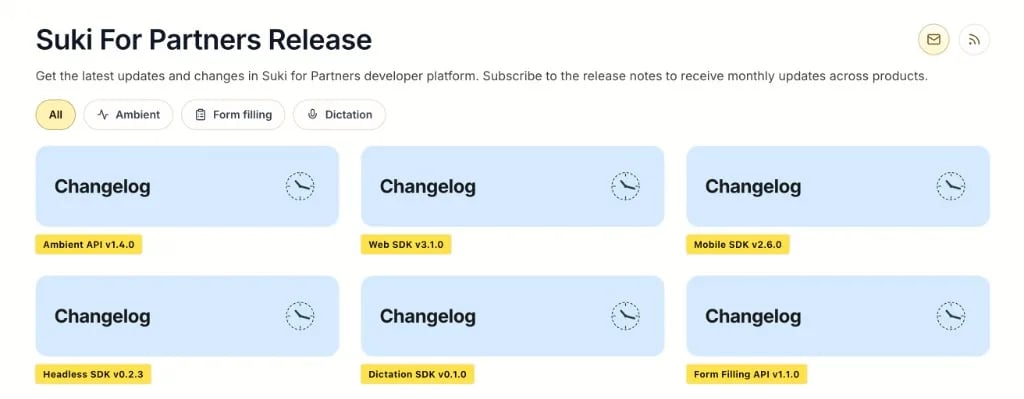
| Product changelogs | Product-specific version history, release details, and migration guidance |
### Product changelogs
We maintain dedicated changelogs for each of our product lines. This helps you understand the specific changes and updates for each product.
For regular updates, we highly recommend subscribing to the [Release notes](/updates/release-notes) hub to receive monthly updates across products.
**How to subscribe:**
| Option | What to do |
| ------------------------------------------------------- | --------------------------------------------------------------------------------------------------------------------------- |
| **RSS** | Open the [Release notes](/updates/release-notes) hub and use the **RSS** button to subscribe to the monthly feed. |
| **Subscribe** | Open the [Release notes](/updates/release-notes) hub and use **Subscribe** to get monthly updates by email across products. |
 ## How to read monthly release notes
Monthly release notes are organized by **calendar month** and **workflow area**, not by a single platform-wide version number.
To review a monthly release:
1. Open the month from the [Release notes](/updates/release-notes) hub.
2. Review the available section headings for that month.
3. Use **product badges** to identify the products relevant to your integration.
4. Read the **Why it matters** section when available.
5. Follow links to changelogs, guides, or API reference documentation before updating production integrations.
### Monthly release note sections
| Section | Description |
| ------------------- | ------------------------------------------------------------------------------------------- |
| **What's new** | New capabilities, workflows, SDKs, or API families |
| **What's enhanced** | Improvements to existing functionality, including additive features and reliability updates |
| **What's changed** | Behavioral updates, terminology changes, operational notes, or partner-facing adjustments |
| **What's removed** | Deprecations and removals, including migration recommendations when available |
**Important**:
* Not every release includes every section.
* Monthly release notes **supplement** changelogs. They do not replace detailed version history.
## Changelog policy
Each product changelog is the **authoritative source** for that product line.
Changelog entries include:
* A release label such as `v3.1.0`
* Tags that summarize the update
* Clear identification of breaking changes
* Integration examples and code snippets when applicable
The [Ambient and Dictation APIs changelog](/api-reference/product-updates/changelog) also supports **scope filters** for narrowing results by API category.
If the same update appears in both release notes and a changelog, use the **changelog** for exact version boundaries and migration guidance.
## Release notes and changelogs
Use **release notes** to understand:
What changed this month across the workflows my organization uses?
Use **changelogs** to understand:
What changed in this specific SDK or API release, and what updates are required in my integration?
**Recommended workflow:**
```mermaid actions={false} theme={"theme":{"light":"github-dark","dark":"material-theme-darker"}}
%%{init: {'theme':'base', 'themeVariables': {'primaryColor':'#6F5410','primaryTextColor':'#FFFFFF','primaryBorderColor':'#6F5410','lineColor':'#6F5410','secondaryColor':'#FFF394','tertiaryColor':'#FFFADE','arrowheadColor':'#6F5410','fontFamily':'Inter, system-ui, sans-serif','fontSize':'14px','edgeLabelBackground':'#FFFADE'}}}%%
flowchart TD
A[Review monthly
## How to read monthly release notes
Monthly release notes are organized by **calendar month** and **workflow area**, not by a single platform-wide version number.
To review a monthly release:
1. Open the month from the [Release notes](/updates/release-notes) hub.
2. Review the available section headings for that month.
3. Use **product badges** to identify the products relevant to your integration.
4. Read the **Why it matters** section when available.
5. Follow links to changelogs, guides, or API reference documentation before updating production integrations.
### Monthly release note sections
| Section | Description |
| ------------------- | ------------------------------------------------------------------------------------------- |
| **What's new** | New capabilities, workflows, SDKs, or API families |
| **What's enhanced** | Improvements to existing functionality, including additive features and reliability updates |
| **What's changed** | Behavioral updates, terminology changes, operational notes, or partner-facing adjustments |
| **What's removed** | Deprecations and removals, including migration recommendations when available |
**Important**:
* Not every release includes every section.
* Monthly release notes **supplement** changelogs. They do not replace detailed version history.
## Changelog policy
Each product changelog is the **authoritative source** for that product line.
Changelog entries include:
* A release label such as `v3.1.0`
* Tags that summarize the update
* Clear identification of breaking changes
* Integration examples and code snippets when applicable
The [Ambient and Dictation APIs changelog](/api-reference/product-updates/changelog) also supports **scope filters** for narrowing results by API category.
If the same update appears in both release notes and a changelog, use the **changelog** for exact version boundaries and migration guidance.
## Release notes and changelogs
Use **release notes** to understand:
What changed this month across the workflows my organization uses?
Use **changelogs** to understand:
What changed in this specific SDK or API release, and what updates are required in my integration?
**Recommended workflow:**
```mermaid actions={false} theme={"theme":{"light":"github-dark","dark":"material-theme-darker"}}
%%{init: {'theme':'base', 'themeVariables': {'primaryColor':'#6F5410','primaryTextColor':'#FFFFFF','primaryBorderColor':'#6F5410','lineColor':'#6F5410','secondaryColor':'#FFF394','tertiaryColor':'#FFFADE','arrowheadColor':'#6F5410','fontFamily':'Inter, system-ui, sans-serif','fontSize':'14px','edgeLabelBackground':'#FFFADE'}}}%%
flowchart TD
A[Review monthly
release notes]
B[Open the related
changelog entries]
C[Review migration
guidance, then
upgrade or deploy]
A --> B --> C
classDef suki fill:#FFFADE,stroke:#6F5410,stroke-width:2px,color:#111827
class A,B,C suki
linkStyle 0 stroke:#6F5410,stroke-width:2px
linkStyle 1 stroke:#6F5410,stroke-width:2px
```
## Recommended best practices
Suki recommends that partners:
* **Pin** SDK and dependency versions in production.
* **Review changelogs** before upgrading.
* Treat **major** releases and **breaking** changes as planned upgrade work.
* **Test** integrations before production rollout.
* Treat **optional fields** and **new endpoints** as additive functionality.
* **Subscribe** to release notifications through RSS or email.
If you have questions about your integration, contact your Suki representative or email [support@suki.ai](mailto:support@suki.ai).