> ## Documentation Index
> Fetch the complete documentation index at: https://developer.suki.ai/llms.txt
> Use this file to discover all available pages before exploring further.

# Note Management

> Learn how to manage clinical notes, content retrieval, and note lifecycle with the Web SDK

<div className="quick-summary-wrapper">
  <div className="quick-summary-header">
    <span className="quick-summary-icon" aria-hidden="true" />

    <span className="quick-summary-title">Quick summary</span>
  </div>

  <div className="quick-summary-content">
    After submitting an ambient session, the Headed Web SDK generates a clinical note in the background. Once ready, you can retrieve the note content and save it to your EHR.

    <br />

    <br />

    Receive note content using either the `onNoteSubmit` prop (React only) or the `note-submission:success` event (React and JavaScript). The SDK provides the note ID, encounter ID, contents organized by sections, and LOINC codes for each section. When medication orders are enabled, the same payload includes an `orders` object. Generated notes will have titles that match the **`visitType`** value passed during session init.
  </div>

  <div className="quick-summary-footer">
    <span className="quick-summary-footer-icon" aria-hidden="true" />

    <span className="quick-summary-footer-text">Last updated:</span>
    <span className="quick-summary-footer-date">June 2026</span>
  </div>
</div>

After submitting an ambient session, the Headed Web SDK generates a clinical note in the background. Once ready, you can retrieve the note content and save it to your EHR.
When Medication orders are enabled, the note submission payload also returns structured Medication orders under **`orders`**. Refer to [Medication orders JSON schema](/web-sdk/medication-orders/payload-structure) for the orders payload structure and field definitions.

## Note generation

Note generation happens automatically after session submission. Generation time depends on connectivity:

* **Online**: Faster generation since audio is processed in real-time during the conversation
* **Offline**: Slower generation since the entire audio file must upload first after connection is restored

For more details, see the [Offline mode](/web-sdk/guides/ambient-offline-mode) guide.

## Receiving note content

When a note is successfully submitted, the Headed Web SDK provides the note content to your application. When Medication orders are enabled, the same response includes an **`orders`** object. Receive the payload using either method:

* **`onNoteSubmit` prop** (React only, recommended)
* **`note-submission:success` event** (React and JavaScript)

<View title="JavaScript" icon="js">
  ```js JavaScript theme={"theme":{"light":"github-dark","dark":"material-theme-darker"}}
  const unsubscribeNoteSubmission = sdkClient.on("note-submission:success", (note) => {
    console.log("Note ID:", note.noteId);
    console.log("Encounter ID:", note.encounterId);
    console.log("Note contents:", note.contents);
    
    // Save to your EHR
    note.contents.forEach((section) => {
      console.log(`Section: ${section.title}`);
      console.log(`Content: ${section.content}`);
      console.log(`LOINC Code: ${section.loinc_code}`);
    });
  });
  ```
</View>

<View title="React" icon="react">
  ```jsx React theme={"theme":{"light":"github-dark","dark":"material-theme-darker"}}
  import { useSuki } from "@suki-sdk/react";
  import { useCallback } from "react";

  const { on } = useSuki();

  useEffect(() => {
    const unsubscribeNoteSubmission = on("note-submission:success", (note) => {
      console.log("Note submitted:", note);
    });

    return () => unsubscribeNoteSubmission();
  }, [on]);

  const handleNoteSubmit = useCallback((note) => {
    console.log("Note ID:", note.noteId);
    console.log("Encounter ID:", note.encounterId);
    
    // Save to your EHR
    note.contents.forEach((section) => {
      console.log(`Section: ${section.title} - ${section.content}`);
      if (section.diagnosis) {
        console.log(`Diagnosis: ${section.diagnosis.icdDescription}`);
      }
    });
  }, []);

  return (
    <SukiAssistant
      onNoteSubmit={handleNoteSubmit}
      // other props
    />
  );
  ```
</View>

### Note titles in the Web SDK UI

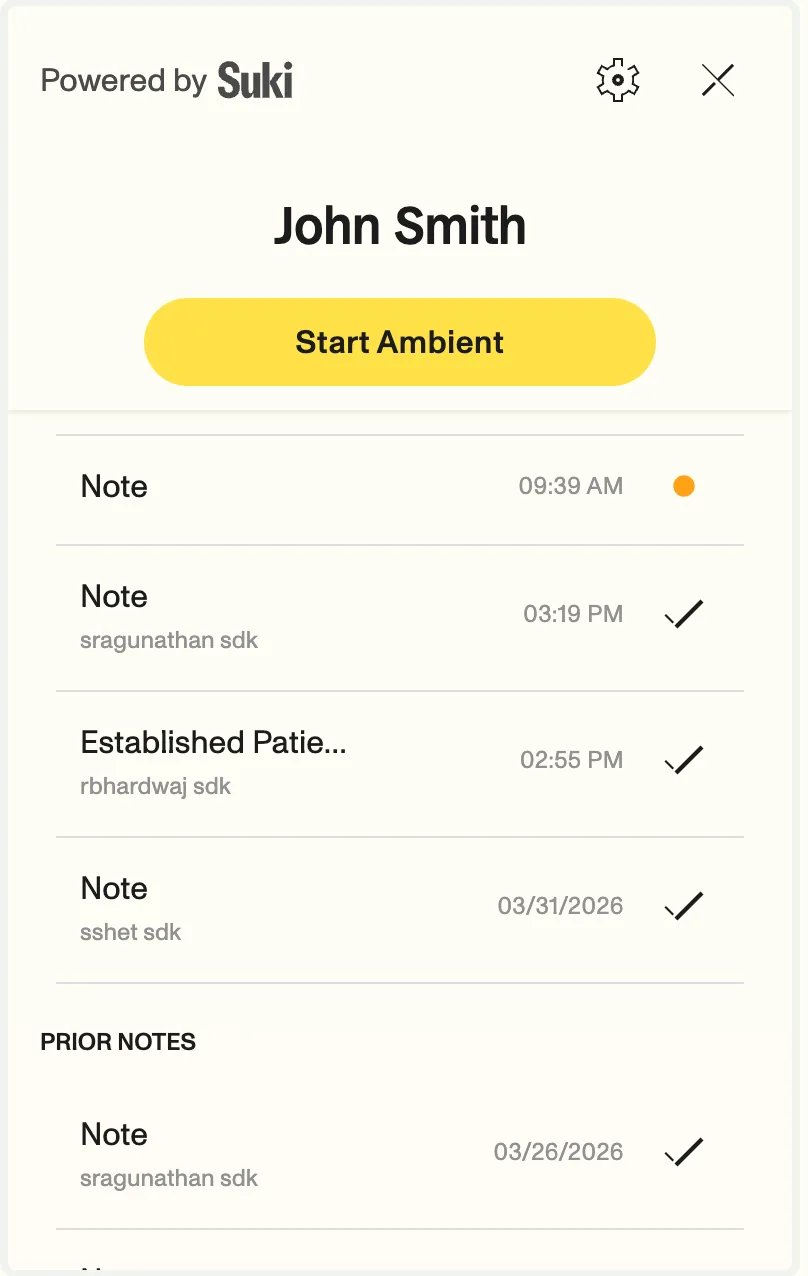
When you pass **`visitType`** in **`ambientOptions`** at session init (for example in `mount`, **`ambientOptions`** on **`SukiAssistant`**, or **`setAmbientOptions`**), the Web SDK uses that value as the **title** for the generated note in the in-product patient note list. The generated note title will match the **`visitType`** value. This helps clinicians distinguish multiple notes created on the same day.

***

<img src="https://mintcdn.com/suki-1e08f176/LBHySdE80QsNv3kf/web-sdk/assets/note-title-show.png?fit=max&auto=format&n=LBHySdE80QsNv3kf&q=85&s=69e56fbf8b1ef1e12f2f0584d14b108c" alt="Note titles in the Web SDK UI" style={{ width: "25%", height: "40%", display: "center", margin: "0 auto" }} width="808" height="1276" data-path="web-sdk/assets/note-title-show.png" />

***

<Note>
  The generated note will have **Created At Timestamp** instead of **Today** date.
</Note>

If **`visitType`** is omitted, the UI keeps the previous generic title behavior and the note title will show as **Note**.

<Tip>
  Use values that match your integration contract (refer to the [visitTypes](/web-sdk/api-reference/types/ambient-options#param-visit-type) reference for more information on
  available enum values). For the full **`ambientOptions`** available parameters, refer to the [AmbientOptions](/web-sdk/api-reference/types/ambient-options) reference guide.
</Tip>

## Response structure

When a note is successfully submitted, you receive a response object with the following structure:

```json JSON theme={"theme":{"light":"github-dark","dark":"material-theme-darker"}}
{
  "noteId": "82467ba8-71bc-46e2-8232-20d4d5629973",
  "encounterId": "encounter-12345",

  "contents": [
    {
      "title": "History",
      "content": "The patient is a 50-year-old female who has been experiencing fever for the last 10 days...",
      "loinc_code": "18233-4",
      "diagnosis": null
    },
    {
      "title": "Review of Systems",
      "content": "- No additional symptoms or pertinent negatives discussed during the encounter.",
      "loinc_code": "10164-2",
      "diagnosis": null
    },
    {
      "title": "Assessment and Plan",
      "content": "Viral hepatitis B with hepatic coma",
      "loinc_code": "51847-2",
      "diagnosis": {
        "icdCode": "B19.11",
        "icdDescription": "Unspecified viral hepatitis B with hepatic coma",
        "snomedCode": "26206000",
        "snomedDescription": "Hepatic coma due to viral hepatitis B",
        "hccCode": "HCC-1",
        "panelRanking": 1,
        "billable": true,
        "problemLabel": "Unspecified viral hepatitis B with hepatic coma"
      }
    }
  ],
  "orders": { // [!code ++:6] New in v3.2.0
    "medication_orders": {
      "values": [],
      "partial_values": []
    }
  }
}
```

### Response fields

<ResponseField name="noteId" type="string">
  Unique identifier for the generated note
</ResponseField>

<ResponseField name="encounterId" type="string">
  Unique identifier for the encounter associated with the note
</ResponseField>

<ResponseField name="contents" type="Array<NoteContent>">
  Array of note sections. Each section contains:

  * `title`: Section title (e.g., "History of Present Illness")
  * `content`: Section content in plain text
  * `loinc_code`: LOINC code for the section (optional)
  * `diagnosis`: Diagnosis information if applicable (optional). Refer to [Diagnosis](/web-sdk/api-reference/types/diagnosis) for complete structure.
</ResponseField>

<ResponseField name="orders" type="object">
  Structured orders returned when medication orders are enabled. Refer to [Medication orders JSON schema](/web-sdk/medication-orders/payload-structure) for field definitions.
</ResponseField>

<Note>
  **`orders`** is included only when Medication orders are enabled for your organization and you pass the Medications LOINC code **`52471-0`** in `ambientOptions.sections`. Refer to [Medication orders integration](/web-sdk/medication-orders/overview) to configure medication orders.
</Note>

For complete type definitions, refer to [NoteContent](/web-sdk/api-reference/types/note-content) and [Diagnosis](/web-sdk/api-reference/types/diagnosis).

## Next steps

<Icon icon="file-lines" iconType="solid" /> Learn about [Token refresh](/web-sdk/guides/token-refresh) to keep sessions alive

<Icon icon="file-lines" iconType="solid" /> Explore [Error handling](/web-sdk/guides/error-handling) for note submission failures