> ## Documentation Index
> Fetch the complete documentation index at: https://developer.suki.ai/llms.txt
> Use this file to discover all available pages before exploring further.
# Web SDK Changelog
> Web SDK product updates and announcements
Suki's SDK versioning policy is based on the semantic versioning standard. For example, in version 1.2.3, 1 is the major version, 2 is the minor version, and 3 is the patch version.
When we release a new SDK version for new features or bug fixes, we increment one of these three version components depending on the type of change introduced.
### Enhancements
* **Interoperability**: The Web SDK now supports interoperability with other Suki products that follow the ambient workflows.
You can now create and access ambient sessions across different Suki products for the same patient encounter.
Learn more about how to enable this feature in the [Interoperability](/web-sdk/guides/ambient-interoperability) guide.
* **Form filling**: Form filling is included with **`@suki-sdk/js`** and **`@suki-sdk/react`**. Import **`FormFillingClient`** from **`@suki-sdk/js`**, or **`FormFillingProvider`**, **`FormFilling`**, and **`useFormFilling`** from **`@suki-sdk/react`**. You do not need to install the separate **`@suki-sdk/form-filling`** or **`@suki-sdk/form-filling-react`** packages. For more information, see the [Web SDK Form filling overview](/web-sdk/form-filling-overview).
### Bug fixes
* Bug fixes and stability improvements.
Please update to the latest version of the Web SDK to get the latest bug fixes and stability improvements.
### Enhancements
* **Medication orders**: The Web SDK now supports **Medication orders generation during ambient sessions**. You can enable this feature by passing the LOINC code `52471-0` in the `ambientOptions.sections` array. Learn more about how to enable this feature in the [Medication orders overview](/web-sdk/medication-orders/overview) guide.
**Implementation**
```js theme={"theme":{"light":"github-dark","dark":"material-theme-darker"}}
sdkClient.mount({
rootElement: document.getElementById("suki-root"),
encounter: encounter,
ambientOptions: {
sections: [
{ loinc: "52471-0" }, // Medication Orders LOINC code
],
},
});
```
```jsx theme={"theme":{"light":"github-dark","dark":"material-theme-darker"}}
```
Medication orders are supported for **v2** and **v3** versions of the Web SDK.
* Use this feature to display suggested medications during provider-patient conversations in the built-in **Orders section** on the clinical note page.
### Enhancements
* **Minimized layout**: The Web SDK now supports a minimized layout during ambient sessions. It turns the Suki Web SDK UI into a compact, viewport-aligned widget so partners reclaim screen space for their own UI (for example, the EHR or patient chart) while Suki Web SDK continues to capture audio in the background.
* Learn more about how to implement minimized layout in the [Minimized layout implementation](/web-sdk/minimized-layout/implementation) guide.
**Implementation**
```js theme={"theme":{"light":"github-dark","dark":"material-theme-darker"}}
sdk.on("ui:layout-change", ({ layout }) => {
// layout: "expanded" | "minimized" | "minimized-paused"
})
```
```jsx theme={"theme":{"light":"github-dark","dark":"material-theme-darker"}}
{
// layout: "expanded" | "minimized" | "minimized-paused"
setIsMinimized(layout !== "expanded");
}}
/>
```
### Major changes - Breaking changes
* Suki Web SDK will now follow the same authentication flow as the other Suki SDKs.
You will now need to pass a `SukiAuthManager` instance from `@suki-sdk/core` instead of passing partner
fields directly on the `initialize()` for **JavaScript** or `init()` for **React** calls.
**Code example**
```js theme={"theme":{"light":"github-dark","dark":"material-theme-darker"}}
import { SukiAuthManager } from "@suki-sdk/core";
import { initialize } from "@suki-sdk/js";
const authManager = new SukiAuthManager({
partnerId: "your-partner-id",
partnerToken: "your-partner-token",
environment: "staging",
autoRegister: true,
loginOnInitialize: true,
providerId: "your-provider-id",
providerName: "Your Provider",
providerOrgId: "your-org-id",
providerSpecialty: "FAMILY_MEDICINE",
});
initialize({
authManager,
});
```
```tsx theme={"theme":{"light":"github-dark","dark":"material-theme-darker"}}
// Use inside . See the Web SDK Quickstart for a full app shell.
import { useEffect, useMemo } from "react";
import { SukiAuthManager } from "@suki-sdk/core";
import { useSuki } from "@suki-sdk/react";
function SukiInit() {
const authManager = useMemo(
() =>
new SukiAuthManager({
partnerId: "your-partner-id",
partnerToken: "your-partner-token",
environment: "staging",
autoRegister: true,
loginOnInitialize: true,
providerId: "your-provider-id",
providerName: "Your Provider",
providerOrgId: "your-org-id",
providerSpecialty: "FAMILY_MEDICINE",
}),
[],
);
const { init, isInitialized } = useSuki();
useEffect(() => {
if (!isInitialized) {
init({ authManager });
}
}, [init, isInitialized, authManager]);
return null;
}
```
* **Dictation capability**: Dictation capability is supported out of the box with `v3.0.0` of the Web SDK.
Refer to the [Migrating to Web SDK v3](/web-sdk/product-updates/migration-to-v3) guide for more details.
### Enhancements
* **Added additional context parameters**: Pass **optional session-level metadata** in `ambientOptions` to improve note generation accuracy. Pass the following parameters along with LOINC codes at session init (in `mount` or `setAmbientOptions`):
* **visitType**: Enum values include `NEW_PATIENT`, `ESTABLISHED_PATIENT`, `WELLNESS`, `ED`.
* **encounterType**: Enum values include `AMBULATORY`, `INPATIENT`, `ED`.
* **providerRole**: Enum values include `PRIMARY/ATTENDING`, `CONSULTING`.
* **reasonForVisit**: String, maximum `255` characters.
* **chiefComplaint**: String, maximum `255` characters.
* All new parameters are **optional**; absence does not break existing flows.
* Free text fields (`reasonForVisit`, `chiefComplaint`) enforce a **255-character limit**.
**Code example**
```json theme={"theme":{"light":"github-dark","dark":"material-theme-darker"}}
{
"ambientOptions": {
"visitType": "ESTABLISHED_PATIENT",
"encounterType": "AMBULATORY",
"providerRole": "PRIMARY/ATTENDING",
"reasonForVisit": "Follow-up for hypertension",
"chiefComplaint": "Headache"
}
}
```
* **Custom note titles from visit type**: When you pass **`visitType`** in **`ambientOptions`**, the Web SDK uses that value as the **title** for the generated note in the in-product patient note list, instead of the generic **Note** label. That makes it easier for clinicians to tell multiple notes apart on the same day. If **`visitType`** is omitted, the UI keeps the previous generic title behavior.
### Enhancements
* **Notification Webhook**: The Web SDK now supports notification webhook. Receive notifications about session completion or failure by implementing your own webhook endpoint.
Learn more about how webhook works and how to implement your own webhook endpoint to receive them in the [Notification webhook for partners](/documentation/webhook/overview) documentation.
* **Existing patient diagnoses for Problem-Based Charting**: Pass the patient's existing diagnoses (e.g. from the EMR) into an ambient session using the `diagnoses` block in `ambientOptions`. The session merges them with what's discussed during the visit so you avoid duplicate problems in the note. Use this when you have at least one PBC section (`isPBNSection: true`); each diagnosis needs one **ICD10** code. Refer to the [Existing patient diagnoses](/web-sdk/guides/ambient-problem-based-charting#existing-patient-diagnoses) guide for more details.
### Enhancements
* **Multilingual capability**: The Web SDK now supports multilingual capability by default. Patients and providers can speak in their preferred language; the SDK generates the clinical note in English. No configuration is required, and you do not need to contact Technical Support to enable this feature.
* **Optional patient fields**: The `birthDate` and `gender` properties are now optional in the `Patient` type. Omit these fields when creating patient objects if the information isn't available, making it easier to integrate patient data from systems where this information may be missing.
### Removed
* **AmbientOptions**: The `prefill.noteTypeIds` property is no longer supported in the `AmbientOptions` type. You must use the `sections` property instead.
### New features
* **Telehealth audio capture**: Capture audio directly from separate tabs from the same browser window hosting your telehealth session. This ensures accurate Ambient clinical documentation during virtual visits via Zoom, Teams, and other telehealth platforms.
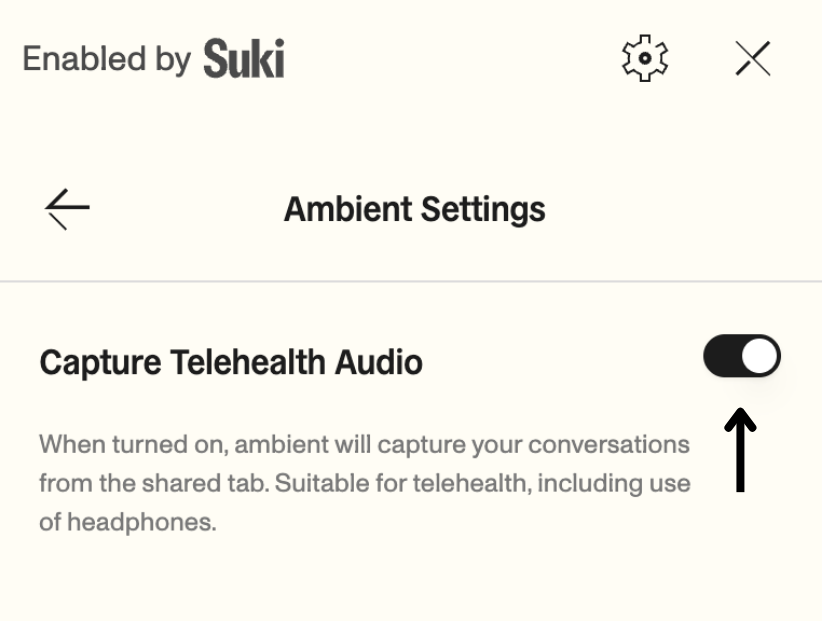 This feature is an **opt-in setting** and is **disabled by default**. To enable this feature, follow the steps in the [Telehealth guide](/web-sdk/guides/telehealth).
### Enhancements
* **Enhanced event monitoring**: Added 6 new authentication events and 5 new ambient session lifecycle events to the `EmitterEvents` type. These events provide granular visibility into login, registration, token refresh, and session state changes, helping you build better error handling and user feedback in your application.
* **Improved offline handling**: Offline mode now includes a 15-second buffer to handle temporary connection problems. This gives you time to show connection status notifications in your UI before the session transitions to offline mode, improving the user experience during brief network interruptions.
* **User feedback collection**: Collect user feedback on AI-generated content directly through the SDK. This helps you gather insights on note quality and user satisfaction.
### New features
* **Bearer token authentication**: Added support for Bearer token authentication by allowing you to pass `providerId` during SDK initialization. This provides more flexibility for authentication workflows.
```js main.js theme={"theme":{"light":"github-dark","dark":"material-theme-darker"}}
import { initialize } from "@suki-sdk/js";
initialize({
partnerId: "your-partner-id",
partnerToken: "your-partner-token",
providerId: "provider-id"
});
```
```jsx App.tsx theme={"theme":{"light":"github-dark","dark":"material-theme-darker"}}
import { useSuki } from "@suki-sdk/react";
const { init } = useSuki();
useEffect(() => {
init({
partnerId: "your-partner-id",
partnerToken: "your-partner-token",
providerId: "provider-id"
});
}, []);
```
### Bug fixes
* Fixed incorrect `isAmbientInProgress` and `isAmbientPaused` flags in `ambient:update` events
* Fixed `activeAmbientId` not resetting in the `useSuki` hook after a session is submitted or cancelled
### Additional changes
* Removed insert script option from section editing in the note page
### New features
* **Problem-based charting support**: Added support for problem-based charting (PBN) with LOINC codes. Use the `isPBNSection` property in your `ambientOptions` to enable problem-based note generation for specific sections.
```json theme={"theme":{"light":"github-dark","dark":"material-theme-darker"}}
{
"ambientOptions": {
"sections": [
{
"loinc": "10164-2", // History of Present Illness
"isPBNSection": true
}
]
}
}
```
Read more about problem-based charting in the [Ambient guide](/web-sdk/guides/ambient-problem-based-charting).
### Enhancements
* **Updated default UI options**: Updated default values for `uiOptions` to match the latest UI configuration. Close button, start ambient button, Dictation, copy, and insert script features are now enabled by default, while the create empty note button is disabled by default.
### Major changes - Breaking changes
* **Automated user registration**: Programmatically create organizations and users during SDK initialization, reducing manual setup and accelerating onboarding workflows.
* **LOINC code integration**: Standardize note sections using LOINC codes, improving note quality, scalability, and integration consistency across healthcare systems.
* **Expanded theme customization**: Enhanced theme options with additional properties for greater control over SDK appearance. Refer to the [Theming guide](/web-sdk/examples/theming-and-customization) for examples and customization options.
### Bug fixes
* Various bug fixes and stability improvements
### Bug fixes
* Various bug fixes and stability improvements
### Bug fixes
* Various bug fixes and stability improvements
### New features
* **Initial stable release**: Enhanced user experience with visual improvements, faster note generation, and improved stability
### New features
* **Initial release**: Clinical note creation by listening to provider-patient conversations
This feature is an **opt-in setting** and is **disabled by default**. To enable this feature, follow the steps in the [Telehealth guide](/web-sdk/guides/telehealth).
### Enhancements
* **Enhanced event monitoring**: Added 6 new authentication events and 5 new ambient session lifecycle events to the `EmitterEvents` type. These events provide granular visibility into login, registration, token refresh, and session state changes, helping you build better error handling and user feedback in your application.
* **Improved offline handling**: Offline mode now includes a 15-second buffer to handle temporary connection problems. This gives you time to show connection status notifications in your UI before the session transitions to offline mode, improving the user experience during brief network interruptions.
* **User feedback collection**: Collect user feedback on AI-generated content directly through the SDK. This helps you gather insights on note quality and user satisfaction.
### New features
* **Bearer token authentication**: Added support for Bearer token authentication by allowing you to pass `providerId` during SDK initialization. This provides more flexibility for authentication workflows.
```js main.js theme={"theme":{"light":"github-dark","dark":"material-theme-darker"}}
import { initialize } from "@suki-sdk/js";
initialize({
partnerId: "your-partner-id",
partnerToken: "your-partner-token",
providerId: "provider-id"
});
```
```jsx App.tsx theme={"theme":{"light":"github-dark","dark":"material-theme-darker"}}
import { useSuki } from "@suki-sdk/react";
const { init } = useSuki();
useEffect(() => {
init({
partnerId: "your-partner-id",
partnerToken: "your-partner-token",
providerId: "provider-id"
});
}, []);
```
### Bug fixes
* Fixed incorrect `isAmbientInProgress` and `isAmbientPaused` flags in `ambient:update` events
* Fixed `activeAmbientId` not resetting in the `useSuki` hook after a session is submitted or cancelled
### Additional changes
* Removed insert script option from section editing in the note page
### New features
* **Problem-based charting support**: Added support for problem-based charting (PBN) with LOINC codes. Use the `isPBNSection` property in your `ambientOptions` to enable problem-based note generation for specific sections.
```json theme={"theme":{"light":"github-dark","dark":"material-theme-darker"}}
{
"ambientOptions": {
"sections": [
{
"loinc": "10164-2", // History of Present Illness
"isPBNSection": true
}
]
}
}
```
Read more about problem-based charting in the [Ambient guide](/web-sdk/guides/ambient-problem-based-charting).
### Enhancements
* **Updated default UI options**: Updated default values for `uiOptions` to match the latest UI configuration. Close button, start ambient button, Dictation, copy, and insert script features are now enabled by default, while the create empty note button is disabled by default.
### Major changes - Breaking changes
* **Automated user registration**: Programmatically create organizations and users during SDK initialization, reducing manual setup and accelerating onboarding workflows.
* **LOINC code integration**: Standardize note sections using LOINC codes, improving note quality, scalability, and integration consistency across healthcare systems.
* **Expanded theme customization**: Enhanced theme options with additional properties for greater control over SDK appearance. Refer to the [Theming guide](/web-sdk/examples/theming-and-customization) for examples and customization options.
### Bug fixes
* Various bug fixes and stability improvements
### Bug fixes
* Various bug fixes and stability improvements
### Bug fixes
* Various bug fixes and stability improvements
### New features
* **Initial stable release**: Enhanced user experience with visual improvements, faster note generation, and improved stability
### New features
* **Initial release**: Clinical note creation by listening to provider-patient conversations