> ## Documentation Index
> Fetch the complete documentation index at: https://developer.suki.ai/llms.txt
> Use this file to discover all available pages before exploring further.

# Welcome To Suki For Partners

> Suki for Partners is Suki's developer platform that provides Clinical documentation, Form filling, and Dictation capabilities into your healthcare applications. With our APIs and SDKs, you can add advanced AI features without the complexity of building and maintaining a clinical AI system. Watch the video below to see Suki for Partners in practice.

<video controls muted loop playsInline className="w-full aspect-video rounded-xl" src="https://mintcdn.com/suki-1e08f176/DZ6zed4nU7jeze_D/documentation/assets/demo.mp4?fit=max&auto=format&n=DZ6zed4nU7jeze_D&q=85&s=fef5cfa36dc14c1c396c67f9c8fa1b29" alt="Suki for Partners platform demonstration video" aria-label="Suki for Partners platform demonstration video" data-path="documentation/assets/demo.mp4">
  Your browser does not support the video tag.
</video>

## Overview

Every patient encounter generates valuable clinical information through conversation.
Clinicians use these conversations to assess patients, make decisions, coordinate care, and document care delivery. Capturing that information across healthcare systems often requires significant administrative effort, adding complexity to already demanding workflows.

Suki's **Ambient Clinical Intelligence** platform transforms clinical conversations into documentation, structured data, and workflow actions.
By combining **ambient listening**, **clinical language understanding**, and **healthcare-specific AI**, Suki helps healthcare organizations reduce administrative burden, streamline workflows, and create more efficient care experiences.

## How healthcare organizations use Suki's Ambient Clinical Intelligence

Today, Suki powers AI experiences across a broad range of healthcare workflows:

* **Telehealth:** Through partnerships such as [Zoom](https://www.suki.ai/press-releases/zoom-and-suki-plan-to-provide-ai-generated-clinical-notes-to-healthcare-institutions/), Suki generates clinical notes directly within virtual care workflows, helping clinicians focus on patient conversations instead of documentation.
* **Care management:** Organizations such as [HealthEdge](https://www.suki.ai/press-releases/healthedge-and-suki-introduce-ambient-clinical-intelligence-for-care-management/) use Suki to bring Ambient Clinical Intelligence into care coordination and post-acute workflows, reducing documentation burden across the continuum of care.
* **Electronic health records (EHR):** Through integrations with EHR platforms including [WellSky](https://www.suki.ai/press-releases/wellsky-launches-ai-powered-ambient-listening-for-specialty-care-ehr/), medent, and [Azalea Health](https://www.suki.ai/press-releases/suki-establishes-program-to-ai-enable-electronic-health-records/), Suki embeds ambient clinical intelligence directly into the systems clinicians already use to document and manage patient care.
* **Revenue cycle management:** Suki supports documentation and coding workflows across revenue cycle management organizations, including collaborations with [Optum Real](https://www.fiercehealthcare.com/ai-and-machine-learning/optum-real-and-suki-build-out-collaboration-r1-teams-heidi-link-ai-scribe), helping improve operational efficiency and financial performance.

## Bring Suki to your product

**Suki for Partners** makes the same technology available through [APIs](/api-reference/overview) and [SDKs](/sdk-overview/overview), allowing healthcare organizations and technology vendors to embed clinically intelligent AI experiences directly into their products and workflows.

Instead of building, training, and maintaining a healthcare AI platform from scratch, you can use Suki's clinically tuned infrastructure to deliver AI-powered experiences within existing healthcare workflows.

## What you can build

With Suki for Partners, you can add capabilities such as:

* **Ambient note generation** to create clinical documentation from patient conversations.
* **Natural language voice interactions** that allow clinicians to complete tasks using speech.
* **Medically tuned dictation** optimized for clinical terminology and healthcare workflows.
* **Voice and text-based Form filling** for faster data capture and documentation.

## Your experience, powered by Suki

You control the user experience, workflow design, and branding.

Suki provides the **clinical intelligence**, **healthcare-specific capabilities**, and **enterprise-grade infrastructure** required to deliver AI-powered healthcare experiences at scale.

This lets you focus on building great healthcare products on a platform designed specifically for the complexity of clinical workflows.

<Callout icon="sparkles">
  Latest capabilities and features to try:

  <Badge icon="sparkles" color="green" size="sm">New</Badge> **Form Filling APIs:** Create and manage Form filling sessions to collect data during in-person visits or virtual encounters. [Learn more](/form-filling-api-reference/overview).

  <Badge icon="sparkles" color="yellow" size="sm">Beta</Badge> **Dictation SDK:** Embed speech-to-text capabilities into your web app with in-field and scratchpad modes. [Learn more](/dictation-sdk/introduction).

  <Badge icon="sparkles" color="yellow" size="sm">Beta</Badge> **Headless Web SDK:** React hooks and core APIs for fully custom clinical UIs. [Learn more](/headless-web-sdk/introduction).

  <Badge icon="sparkles" color="green" size="sm">New</Badge> **Audio Dictation APIs:** Create sessions, stream audio, and retrieve transcripts for real-time dictation workflows. [Learn more](/documentation/dictation).

  <Badge icon="sparkles" color="green" size="sm">New</Badge> **Audio Streaming and Download API:** Stream or download original audio from ambient sessions for playback, QA, or archival. [Learn more](/documentation/audio-streaming-download).
</Callout>

## Recommended path for getting started

Follow these steps to go from zero to a working Suki for Partners integration.

<Accordion title="Start your integration" defaultOpen="true">
  <Steps>
    <Step title="Read the quickstart guide" icon="rocket">
      Set up your environment, review prerequisites, and run your first integration steps against Suki for Partners.

      <a href="/documentation/getting-started" className="learning-path-button">Learn more</a>
    </Step>

    <Step title="Learn how to get access to Suki APIs and SDKs" icon="key">
      Understand how Partner IDs, tokens, and secure access work so your app can call Suki APIs and SDKs safely.

      <a href="/documentation/partner-authentication" className="learning-path-button">Learn more</a>
    </Step>

    <Step title="Choose your workflow" icon="sliders">
      Choose between Ambient Workflows and Form filling workflows to pick the workflow that fits your use case.

      <a href="/documentation/workflows" className="learning-path-button">Learn more</a>
    </Step>

    <Step title="Explore product capabilities" icon="list">
      Dig into ambient documentation, dictation, note sections, multilingual support, and other features you can ship in your product.

      <a href="/documentation/note-sections" className="learning-path-button">Learn more</a>
    </Step>

    <Step title="Explore use cases" icon="magnifying-glass">
      Explore the most common use cases for Suki for Partners.

      <a href="/documentation/use-case" className="learning-path-button">Learn more</a>
    </Step>
  </Steps>

  <Note>
    This documentation focuses on Suki for Partners. For Suki Assistant (the end-user app), contact{' '}
    <a href="mailto:support@suki.ai">support</a>.
  </Note>
</Accordion>

## Why choose Suki for Partners?

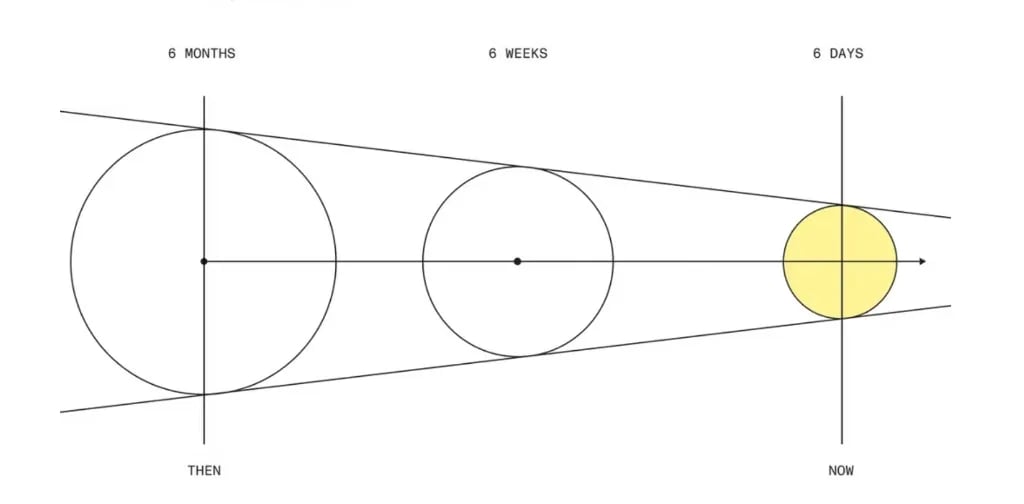
Building AI capabilities in-house is complex and time-consuming. Suki for Partners gives you a faster way to add AI-powered healthcare features without building and maintaining your own AI infrastructure.

Move from months of in-house development to shipping AI features in days.

<div style={{ maxWidth: '40rem', marginLeft: 'auto', marginRight: 'auto', marginTop: '1.5rem', marginBottom: '1.5rem' }}>
  <img src="https://mintcdn.com/suki-1e08f176/JWCBr7FDuYx75ifb/documentation/assets/partners-time-to-market.webp?fit=max&auto=format&n=JWCBr7FDuYx75ifb&q=85&s=dbbe3d8add6f4bb99af3ac6b34cd68f5" alt="Timeline diagram: six months of in-house build, then six weeks, now six days with Suki for Partners" width={1024} height={504} style={{ width: '100%', height: 'auto', display: 'block', borderRadius: '10px', border: '1px solid #e0e0e0' }} loading="eager" decoding="async" data-path="documentation/assets/partners-time-to-market.webp" />
</div>

Whether you're building EHRs, telehealth platforms, care management systems, or revenue cycle tools, our developer toolkit helps you accelerate your AI roadmap without the heavy development work.

## Key benefits

<AccordionGroup>
  <Accordion title="Purpose-Built for Healthcare" icon="heart">
    Built specifically for healthcare, enabling you to quickly deploy clinical workflows and documentation features.
  </Accordion>

  <Accordion title="AI Differentiation" icon="sparkles">
    Use the latest AI technology to differentiate your solutions and position yourself as a market leader.
  </Accordion>

  <Accordion title="Customizable" icon="paint-brush">
    Customize the look and feel of your application to match your brand with our web SDK.
  </Accordion>

  <Accordion title="Higher User Adoption" icon="user">
    Drive stronger user adoption and retention by reducing clinician burnout.
  </Accordion>

  <Accordion title="Secure & Compliant" icon="lock">
    Compliant with HIPAA guidelines with secure and private data handling.
  </Accordion>

  <Accordion title="Fast Integration" icon="rocket">
    Skip long development cycles. Integration takes weeks, not months.
  </Accordion>
</AccordionGroup>

## What can you build with Suki for Partners?

Use Suki for Partners to build:

<div className="sdk-overview-build-cards doc-partners-overview-card-groups">
  <CardGroup cols={2}>
    <Card title="Clinical Documentation (Ambient)" icon="file-text">
      Automatically generate clinical documentation from doctor-patient conversations.
    </Card>

    <Card title="Voice-Powered Workflows" icon="microphone">
      Add natural language interaction to your healthcare applications.
    </Card>

    <Card title="EHR Integration" icon="database">
      Seamlessly connect with existing electronic health records (EHRs) and telehealth platforms.
    </Card>

    <Card title="Mobile Healthcare Apps" icon="mobile">
      Build iOS and Android apps with AI-powered clinical documentation features.
    </Card>
  </CardGroup>
</div>

## Key capabilities

Suki for Partners includes powerful ambient capabilities to enhance your healthcare applications. Refer to the cards below for more details on each capability.

<div className="sdk-overview-core-capabilities-cards doc-partners-overview-card-groups">
  <CardGroup cols={3}>
    <Card title="Multilingual Support" icon="language" href="/api-reference/capabilities/multilingual" cta="Learn more">
      <div className="doc-overview-cap-badges">
        <span className="doc-overview-cap-pill">80+ Languages</span>
      </div>

      Support 80+ languages with automatic English note generation.
    </Card>

    <Card title="Personalization" icon="user" href="/api-reference/capabilities/personalization" cta="Learn more">
      <div className="doc-overview-cap-badges">
        <span className="doc-overview-cap-pill">Customizable</span>
      </div>

      Customize note generation based on provider preferences.
    </Card>

    <Card title="Problem-Based Charting" icon="list" href="/api-reference/capabilities/problem-based-charting" cta="Learn more">
      <div className="doc-overview-cap-badges">
        <span className="doc-overview-cap-pill">PBC</span>
      </div>

      Organize clinical notes by patient problems and diagnoses instead of traditional sections.
    </Card>

    <Card title="Note Sections" icon="file-text" href="/documentation/note-sections" cta="Learn more">
      <div className="doc-overview-cap-badges">
        <span className="doc-overview-cap-pill">LOINC</span>
      </div>

      Configure custom clinical note sections using standard LOINC codes.
    </Card>

    <Card title="Clinical Documentation (Ambient)" icon="waveform" href="/documentation/ambient-documentation" cta="Learn more">
      <div className="doc-overview-cap-badges">
        <span className="doc-overview-cap-pill">AI-Powered</span>
      </div>

      Automatically generate clinical notes from patient-provider conversations.
    </Card>

    <Card title="Specialties" icon="stethoscope" href="/documentation/specialties" cta="Learn more">
      <div className="doc-overview-cap-badges">
        <span className="doc-overview-cap-pill">Specialized</span>
      </div>

      Optimize note generation for specific medical specialties.
    </Card>
  </CardGroup>

  <CardGroup cols={2}>
    <Card title="Dictation" icon="microphone" href="/documentation/dictation" cta="Learn more">
      <div className="doc-overview-cap-badges">
        <span className="doc-overview-cap-pill">New</span>
        <span className="doc-overview-cap-pill">Real-time</span>
      </div>

      Real-time audio transcription for converting patient-provider conversations into text.
    </Card>

    <Card title="Form Filling" icon="file-lines" href="/documentation/form-filling" cta="Learn more">
      <div className="doc-overview-cap-badges">
        <span className="doc-overview-cap-pill">New</span>
        <span className="doc-overview-cap-pill">Form filling</span>
      </div>

      Create Form filling sessions for nursing and other clinical workflows.
    </Card>
  </CardGroup>
</div>

## How to integrate with Suki for Partners?

Based on your use case and workflow, you can select the integration method that fits your project's requirements, UI strategy, and technical approach:

<Tabs>
  <Tab title="Ambient Workflows" id="ambient-workflows-path" icon="waveform">
    Choose the integration method that fits your project's requirements, UI strategy, and technical approach:

    <div className="hp-io-method-grid">
      <div role="article" className="hp-io-method-card">
        <div className="hp-io-method-card-hero" aria-hidden="true">
          <svg className="hp-io-method-card-hero-icon" width="48" height="48" viewBox="0 0 64 64" fill="none" xmlns="http://www.w3.org/2000/svg">
            <rect x="10" y="18" width="44" height="28" rx="4" stroke="currentColor" strokeWidth="1.25" />

            <path d="M16 32h6l5-10 6 20 5-10h10" stroke="currentColor" strokeWidth="3" strokeLinecap="round" strokeLinejoin="round" />
          </svg>
        </div>

        <div className="hp-io-method-card-body">
          <h3 className="hp-io-method-card-title">Ambient REST APIs</h3>

          <p className="hp-io-method-card-desc">
            Use our APIs for direct access to Suki's AI features. Ideal when you need to build a completely custom user interface, integrate specific functions into an existing system, or keep full control over the user experience.
          </p>

          <p className="hp-io-method-card-desc">
            Access capabilities like <strong>ambient documentation</strong>, <strong>speech recognition</strong>, <strong>Form filling</strong>, and <strong>coding assistance</strong>.
          </p>

          <div role="navigation" className="hp-io-method-link-stack" aria-label="REST API resources">
            <a href="/documentation/getting-started" className="hp-io-method-link hp-io-method-link--featured">
              <span className="hp-io-method-link-icon" aria-hidden="true">
                <svg width="18" height="18" viewBox="0 0 24 24" fill="none" xmlns="http://www.w3.org/2000/svg">
                  <path d="M10.5 8.25v7.5l5.25-3.75-5.25-3.75z" fill="none" stroke="currentColor" strokeWidth="1.5" strokeLinejoin="round" />
                </svg>
              </span>

              <span className="hp-io-method-link-text">Quickstart</span>
            </a>

            <a href="/api-reference/overview" className="hp-io-method-link">
              <span className="hp-io-method-link-icon" aria-hidden="true">
                <svg width="18" height="18" viewBox="0 0 24 24" fill="none" xmlns="http://www.w3.org/2000/svg">
                  <path d="M10 8.25l4.25 3.75L10 15.75" fill="none" stroke="currentColor" strokeWidth="1.5" strokeLinecap="round" strokeLinejoin="round" />
                </svg>
              </span>

              <span className="hp-io-method-link-text">API overview</span>
            </a>

            <a href="/documentation/partner-authentication" className="hp-io-method-link">
              <span className="hp-io-method-link-icon" aria-hidden="true">
                <svg width="18" height="18" viewBox="0 0 24 24" fill="none" xmlns="http://www.w3.org/2000/svg">
                  <rect x="5.5" y="4.5" width="13" height="15" rx="1.5" fill="none" stroke="currentColor" strokeWidth="1.5" />

                  <path d="M8.5 9h7M8.5 12h5.5" stroke="currentColor" strokeWidth="1.25" strokeLinecap="round" />
                </svg>
              </span>

              <span className="hp-io-method-link-text">Partner authentication</span>
            </a>
          </div>

          <div className="hp-io-method-card-aside">
            <p className="hp-io-method-card-aside-text">
              Our Ambient Clinician Note Generation API is currently in <strong>Early Access</strong>. To request access, contact our{' '}
              <a href="https://www.suki.ai/suki-partners/" className="suki-feature-cta">Partnership team</a>.
            </p>
          </div>
        </div>
      </div>

      <div role="article" className="hp-io-method-card">
        <div className="hp-io-method-card-hero" aria-hidden="true">
          <svg className="hp-io-method-card-hero-icon" width="48" height="48" viewBox="0 0 64 64" fill="none" xmlns="http://www.w3.org/2000/svg">
            <rect x="10" y="14" width="44" height="36" rx="4" stroke="currentColor" strokeWidth="1.25" />

            <path d="M10 22h44" stroke="currentColor" strokeWidth="1.25" />

            <rect x="14" y="28" width="12" height="18" rx="2" stroke="currentColor" strokeWidth="3" />

            <rect x="30" y="28" width="20" height="8" rx="2" stroke="currentColor" strokeWidth="3" />

            <path d="M30 40h20" stroke="currentColor" strokeWidth="1.25" strokeLinecap="round" />

            <path d="M30 46h14" stroke="currentColor" strokeWidth="1.25" strokeLinecap="round" />
          </svg>
        </div>

        <div className="hp-io-method-card-body">
          <h3 className="hp-io-method-card-title">Web SDK</h3>

          <p className="hp-io-method-card-desc">
            The Suki <strong>Web SDK</strong> includes <strong>pre-built UI components</strong> for quick integration into web-based healthcare applications. Use ready-to-use components to add clinical workflows like note-taking without designing the full UI yourself.
          </p>

          <div role="navigation" className="hp-io-method-link-stack" aria-label="Web SDK resources">
            <a href="/web-sdk/quickstart" className="hp-io-method-link hp-io-method-link--featured">
              <span className="hp-io-method-link-icon" aria-hidden="true">
                <svg width="18" height="18" viewBox="0 0 24 24" fill="none" xmlns="http://www.w3.org/2000/svg">
                  <path d="M10.5 8.25v7.5l5.25-3.75-5.25-3.75z" fill="none" stroke="currentColor" strokeWidth="1.5" strokeLinejoin="round" />
                </svg>
              </span>

              <span className="hp-io-method-link-text">Quickstart</span>
            </a>

            <a href="/web-sdk/overview" className="hp-io-method-link">
              <span className="hp-io-method-link-icon" aria-hidden="true">
                <svg width="18" height="18" viewBox="0 0 24 24" fill="none" xmlns="http://www.w3.org/2000/svg">
                  <path d="M10 8.25l4.25 3.75L10 15.75" fill="none" stroke="currentColor" strokeWidth="1.5" strokeLinecap="round" strokeLinejoin="round" />
                </svg>
              </span>

              <span className="hp-io-method-link-text">Web SDK overview</span>
            </a>

            <a href="/web-sdk/guides/ambient-implementation" className="hp-io-method-link">
              <span className="hp-io-method-link-icon" aria-hidden="true">
                <svg width="18" height="18" viewBox="0 0 24 24" fill="none" xmlns="http://www.w3.org/2000/svg">
                  <rect x="5.5" y="4.5" width="13" height="15" rx="1.5" fill="none" stroke="currentColor" strokeWidth="1.5" />

                  <path d="M8.5 9h7M8.5 12h5.5" stroke="currentColor" strokeWidth="1.25" strokeLinecap="round" />
                </svg>
              </span>

              <span className="hp-io-method-link-text">Implementation</span>
            </a>
          </div>
        </div>
      </div>

      <div role="article" className="hp-io-method-card">
        <div className="hp-io-method-card-hero" aria-hidden="true">
          <svg className="hp-io-method-card-hero-icon" width="48" height="48" viewBox="0 0 64 64" fill="none" xmlns="http://www.w3.org/2000/svg">
            <rect x="12" y="14" width="40" height="36" rx="4" stroke="currentColor" strokeWidth="1.25" />

            <path d="M18 26l4 4-4 4" stroke="currentColor" strokeWidth="3" strokeLinecap="round" strokeLinejoin="round" />

            <path d="M28 30h14" stroke="currentColor" strokeWidth="3" strokeLinecap="round" />

            <path d="M18 38h24" stroke="currentColor" strokeWidth="1.25" strokeLinecap="round" />

            <path d="M18 44h18" stroke="currentColor" strokeWidth="1.25" strokeLinecap="round" />
          </svg>
        </div>

        <div className="hp-io-method-card-body">
          <div className="hp-io-method-card-title-row">
            <h3 className="hp-io-method-card-title">Headless Web SDK</h3>
            <Badge icon="sparkles" color="yellow" size="sm">Beta</Badge>
          </div>

          <p className="hp-io-method-card-desc">
            For <strong>React 18+</strong> apps that need full control over layout and branding. Use our hooks and core APIs for authentication, ambient sessions, and streaming while you build every screen to match your design system.
          </p>

          <div role="navigation" className="hp-io-method-link-stack" aria-label="Headless Web SDK resources">
            <a href="/headless-web-sdk/quickstart" className="hp-io-method-link hp-io-method-link--featured">
              <span className="hp-io-method-link-icon" aria-hidden="true">
                <svg width="18" height="18" viewBox="0 0 24 24" fill="none" xmlns="http://www.w3.org/2000/svg">
                  <path d="M10.5 8.25v7.5l5.25-3.75-5.25-3.75z" fill="none" stroke="currentColor" strokeWidth="1.5" strokeLinejoin="round" />
                </svg>
              </span>

              <span className="hp-io-method-link-text">Quickstart</span>
            </a>

            <a href="/headless-web-sdk/introduction" className="hp-io-method-link">
              <span className="hp-io-method-link-icon" aria-hidden="true">
                <svg width="18" height="18" viewBox="0 0 24 24" fill="none" xmlns="http://www.w3.org/2000/svg">
                  <path d="M10 8.25l4.25 3.75L10 15.75" fill="none" stroke="currentColor" strokeWidth="1.5" strokeLinecap="round" strokeLinejoin="round" />
                </svg>
              </span>

              <span className="hp-io-method-link-text">Headless Web SDK overview</span>
            </a>

            <a href="/documentation/integration-decision-guide" className="hp-io-method-link">
              <span className="hp-io-method-link-icon" aria-hidden="true">
                <svg width="18" height="18" viewBox="0 0 24 24" fill="none" xmlns="http://www.w3.org/2000/svg">
                  <rect x="5.5" y="4.5" width="13" height="15" rx="1.5" fill="none" stroke="currentColor" strokeWidth="1.5" />

                  <path d="M8.5 9h7M8.5 12h5.5" stroke="currentColor" strokeWidth="1.25" strokeLinecap="round" />
                </svg>
              </span>

              <span className="hp-io-method-link-text">Compare integration options</span>
            </a>
          </div>

          <div className="hp-io-method-card-aside">
            <p className="hp-io-method-card-aside-text">
              The Headless Web SDK is currently in <strong>Beta</strong> phase.
            </p>
          </div>
        </div>
      </div>

      <div role="article" className="hp-io-method-card">
        <div className="hp-io-method-card-hero" aria-hidden="true">
          <svg className="hp-io-method-card-hero-icon" width="48" height="48" viewBox="0 0 64 64" fill="none" xmlns="http://www.w3.org/2000/svg">
            <rect x="22" y="8" width="20" height="48" rx="5" stroke="currentColor" strokeWidth="1.25" />

            <rect x="26" y="14" width="12" height="34" rx="2" stroke="currentColor" strokeWidth="3" />

            <circle cx="32" cy="52" r="1.5" fill="currentColor" />
          </svg>
        </div>

        <div className="hp-io-method-card-body">
          <h3 className="hp-io-method-card-title">Mobile SDK</h3>

          <p className="hp-io-method-card-desc">
            The Suki <strong>Mobile SDK</strong> is a headless SDK for native mobile applications. Design your own UI while using our SDK's functions for note generation, with strong backend functionality and maximum layout flexibility.
          </p>

          <div role="navigation" className="hp-io-method-link-stack" aria-label="Mobile SDK resources">
            <a href="/mobile-sdk/installation" className="hp-io-method-link hp-io-method-link--featured">
              <span className="hp-io-method-link-icon" aria-hidden="true">
                <svg width="18" height="18" viewBox="0 0 24 24" fill="none" xmlns="http://www.w3.org/2000/svg">
                  <path d="M10.5 8.25v7.5l5.25-3.75-5.25-3.75z" fill="none" stroke="currentColor" strokeWidth="1.5" strokeLinejoin="round" />
                </svg>
              </span>

              <span className="hp-io-method-link-text">Quickstart</span>
            </a>

            <a href="/mobile-sdk/overview" className="hp-io-method-link">
              <span className="hp-io-method-link-icon" aria-hidden="true">
                <svg width="18" height="18" viewBox="0 0 24 24" fill="none" xmlns="http://www.w3.org/2000/svg">
                  <path d="M10 8.25l4.25 3.75L10 15.75" fill="none" stroke="currentColor" strokeWidth="1.5" strokeLinecap="round" strokeLinejoin="round" />
                </svg>
              </span>

              <span className="hp-io-method-link-text">Mobile SDK overview</span>
            </a>

            <a href="/mobile-sdk/ambient-guides/create-session" className="hp-io-method-link">
              <span className="hp-io-method-link-icon" aria-hidden="true">
                <svg width="18" height="18" viewBox="0 0 24 24" fill="none" xmlns="http://www.w3.org/2000/svg">
                  <rect x="5.5" y="4.5" width="13" height="15" rx="1.5" fill="none" stroke="currentColor" strokeWidth="1.5" />

                  <path d="M8.5 9h7M8.5 12h5.5" stroke="currentColor" strokeWidth="1.25" strokeLinecap="round" />
                </svg>
              </span>

              <span className="hp-io-method-link-text">Create session</span>
            </a>
          </div>

          <div className="hp-io-method-card-aside">
            <p className="hp-io-method-card-aside-text">
              Currently supports <strong>iOS</strong>. <strong>Android</strong> support is <strong>coming soon</strong>.
            </p>
          </div>
        </div>
      </div>

      <div role="article" className="hp-io-method-card">
        <div className="hp-io-method-card-hero" aria-hidden="true">
          <svg className="hp-io-method-card-hero-icon" width="48" height="48" viewBox="0 0 64 64" fill="none" xmlns="http://www.w3.org/2000/svg">
            <rect x="26" y="12" width="12" height="20" rx="6" stroke="currentColor" strokeWidth="3" />

            <path d="M20 26a12 12 0 0 0 24 0" stroke="currentColor" strokeWidth="1.25" strokeLinecap="round" />

            <path d="M32 38v8" stroke="currentColor" strokeWidth="1.25" strokeLinecap="round" />

            <path d="M24 46h16" stroke="currentColor" strokeWidth="1.25" strokeLinecap="round" />
          </svg>
        </div>

        <div className="hp-io-method-card-body">
          <div className="hp-io-method-card-title-row">
            <h3 className="hp-io-method-card-title">Dictation SDK</h3>
            <Badge icon="sparkles" color="yellow" size="sm">Beta</Badge>
          </div>

          <p className="hp-io-method-card-desc">
            Embed <strong>clinical dictation</strong> in web applications with a <strong>hosted iframe</strong>. Use <strong>in-field</strong> mode on a specific text control or <strong>scratchpad</strong> mode for a floating dictation surface. Integrate with <strong>JavaScript</strong> or <strong>React</strong>; you design entry points and receive transcript text through callbacks.
          </p>

          <div role="navigation" className="hp-io-method-link-stack" aria-label="Dictation SDK resources">
            <a href="/dictation-sdk/quickstart" className="hp-io-method-link hp-io-method-link--featured">
              <span className="hp-io-method-link-icon" aria-hidden="true">
                <svg width="18" height="18" viewBox="0 0 24 24" fill="none" xmlns="http://www.w3.org/2000/svg">
                  <path d="M10.5 8.25v7.5l5.25-3.75-5.25-3.75z" fill="none" stroke="currentColor" strokeWidth="1.5" strokeLinejoin="round" />
                </svg>
              </span>

              <span className="hp-io-method-link-text">Quickstart</span>
            </a>

            <a href="/dictation-sdk/introduction" className="hp-io-method-link">
              <span className="hp-io-method-link-icon" aria-hidden="true">
                <svg width="18" height="18" viewBox="0 0 24 24" fill="none" xmlns="http://www.w3.org/2000/svg">
                  <path d="M10 8.25l4.25 3.75L10 15.75" fill="none" stroke="currentColor" strokeWidth="1.5" strokeLinecap="round" strokeLinejoin="round" />
                </svg>
              </span>

              <span className="hp-io-method-link-text">Dictation SDK overview</span>
            </a>

            <a href="/dictation-sdk/javaScript-integration/javaScript" className="hp-io-method-link">
              <span className="hp-io-method-link-icon" aria-hidden="true">
                <svg width="18" height="18" viewBox="0 0 24 24" fill="none" xmlns="http://www.w3.org/2000/svg">
                  <rect x="5.5" y="4.5" width="13" height="15" rx="1.5" fill="none" stroke="currentColor" strokeWidth="1.5" />

                  <path d="M8.5 9h7M8.5 12h5.5" stroke="currentColor" strokeWidth="1.25" strokeLinecap="round" />
                </svg>
              </span>

              <span className="hp-io-method-link-text">JavaScript integration</span>
            </a>
          </div>

          <div className="hp-io-method-card-aside">
            <p className="hp-io-method-card-aside-text">
              The Dictation SDK is currently in <strong>Beta</strong> phase.
            </p>
          </div>
        </div>
      </div>
    </div>
  </Tab>

  <Tab title="Form Filling Workflows" id="form filling-workflows-path" icon="file-lines">
    Choose the integration method that fits your project's requirements, UI strategy, and technical approach:

    <div className="hp-io-method-grid">
      <div role="article" className="hp-io-method-card">
        <div className="hp-io-method-card-hero" aria-hidden="true">
          <svg className="hp-io-method-card-hero-icon" width="48" height="48" viewBox="0 0 64 64" fill="none" xmlns="http://www.w3.org/2000/svg">
            <rect x="12" y="14" width="16" height="16" rx="3" stroke="currentColor" strokeWidth="3" />

            <rect x="36" y="14" width="16" height="16" rx="3" stroke="currentColor" strokeWidth="1.25" />

            <rect x="12" y="34" width="16" height="16" rx="3" stroke="currentColor" strokeWidth="1.25" />

            <rect x="36" y="34" width="16" height="16" rx="3" stroke="currentColor" strokeWidth="3" />
          </svg>
        </div>

        <div className="hp-io-method-card-body">
          <h3 className="hp-io-method-card-title">Form filling REST APIs</h3>

          <p className="hp-io-method-card-desc">
            Use our Form Filling APIs for direct access to structured medical-form workflows. Ideal when you need a completely custom user interface, integrate into an existing system, or keep full control over capture, session lifecycle, and how structured output is saved.
          </p>

          <p className="hp-io-method-card-desc">
            Create sessions, seed context, stream audio over the shared Partner Ambient <strong>WebSocket</strong>, retrieve <strong>structured form data</strong>, and submit feedback using REST endpoints.
          </p>

          <div role="navigation" className="hp-io-method-link-stack" aria-label="Form Filling API resources">
            <a href="/form-filling-api-reference/quickstart" className="hp-io-method-link hp-io-method-link--featured">
              <span className="hp-io-method-link-icon" aria-hidden="true">
                <svg width="18" height="18" viewBox="0 0 24 24" fill="none" xmlns="http://www.w3.org/2000/svg">
                  <path d="M10.5 8.25v7.5l5.25-3.75-5.25-3.75z" fill="none" stroke="currentColor" strokeWidth="1.5" strokeLinejoin="round" />
                </svg>
              </span>

              <span className="hp-io-method-link-text">Quickstart</span>
            </a>

            <a href="/form-filling-api-reference/overview" className="hp-io-method-link">
              <span className="hp-io-method-link-icon" aria-hidden="true">
                <svg width="18" height="18" viewBox="0 0 24 24" fill="none" xmlns="http://www.w3.org/2000/svg">
                  <path d="M10 8.25l4.25 3.75L10 15.75" fill="none" stroke="currentColor" strokeWidth="1.5" strokeLinecap="round" strokeLinejoin="round" />
                </svg>
              </span>

              <span className="hp-io-method-link-text">API overview</span>
            </a>

            <a href="/form-filling-api-reference/authentication" className="hp-io-method-link">
              <span className="hp-io-method-link-icon" aria-hidden="true">
                <svg width="18" height="18" viewBox="0 0 24 24" fill="none" xmlns="http://www.w3.org/2000/svg">
                  <rect x="5.5" y="4.5" width="13" height="15" rx="1.5" fill="none" stroke="currentColor" strokeWidth="1.5" />

                  <path d="M8.5 9h7M8.5 12h5.5" stroke="currentColor" strokeWidth="1.25" strokeLinecap="round" />
                </svg>
              </span>

              <span className="hp-io-method-link-text">Authentication</span>
            </a>
          </div>

          <div className="hp-io-method-card-aside">
            <p className="hp-io-method-card-aside-text">
              For streaming audio and shared WebSocket behavior, see{' '}
              <a href="/documentation/audio-stream" className="suki-feature-cta">Audio streaming</a>.
            </p>
          </div>
        </div>
      </div>
    </div>
  </Tab>
</Tabs>
