

ambientOptions so sessions carry more context, notes read better in the UI, and the patient note list can show visit type as the title instead of Note on every row.
For the Mobile SDK, we’ve added optional orders info
for medications and EMR info for ambient sessions. For the API, new info endpoints return supported
values for medication coding systems, dosage units, encounter relations, frequencies, medication timings, origins, and statuses.
What’s new
New Features
New features
Dictation SDK v0.1.0Dictation SDK (beta): First release of the Suki Dictation SDK. Embed clinical Dictation in your web app with a hosted iframe, in-field mode tied to a text field or scratchpad mode for a floating Dictation UI, and JavaScript or React integration. You control how users start Dictation; the SDK returns transcript text through callbacks.Why it matters: Ship browser-based clinical Dictation without building the full Dictation UI yourself, while keeping your own chrome and workflows.Learn more in the Dictation SDK introduction documentation and Changelog.API v1.3.0New info endpoints: Added new endpoints to get the list of supported medication coding systems, dosage units, encounter relations, frequencies, medication timings, origins, and statuses.Endpoints:
- GET /api/v1/info/orders/coding-systems to get the list of supported medication coding systems.
- GET /api/v1/info/orders/dosage-units to get the list of supported medication dosage units.
- GET /api/v1/info/orders/encounter-relations to get the list of supported encounter relations.
- GET /api/v1/info/orders/frequencies to get the list of supported medication frequencies.
- GET /api/v1/info/orders/medication-timings to get the list of supported medication timings.
- GET /api/v1/info/orders/origins to get the list of supported medication origins.
- GET /api/v1/info/orders/statuses to get the list of supported medication statuses.
What’s enhanced
Enhancements
Enhancements
Web SDK v3.0.0 | Breaking changesWeb SDK new authentication flow: Sign-in now goes through SukiAuthManager from @suki-sdk/core, the same model as our other SDKs. Add that core package next to @suki-sdk/js or @suki-sdk/react, configure partner credentials, staging or production, and provider details on the manager, and pass the manager when you start the Web SDK in JavaScript or React. You no longer rely on putting those fields only on the init call. Pick stage versus production with the manager’s environment setting instead of test mode on init options.Why it matters: One auth surface across SDKs, clearer separation between sign-in and UI setup, and explicit environment choice before the hosted experience loads.Learn more in the Migrating to Web SDK v3 guide.Web SDK v2.2.0Optional session-level metadata: Pass visit context (
visitType, encounterType, reasonForVisit, chiefComplaint) and providerRole in ambientOptions to improve note generation. Pass these at session init (e.g. in mount or when calling setAmbientOptions).Why it matters: Improve note generation accuracy by passing session-level metadata alongside your LOINC sections.Learn more in the Ambient implementation guide and AmbientOptions reference.Web SDK v2.2.0Custom note titles: We’ve updated the Web SDK so the patient note list can show a real title instead of Note for every entry.Set
visitType in ambientOptions when you start the session (same place you pass the other visit fields). The list uses that value as the note title. If you skip it, behavior stays the same as before.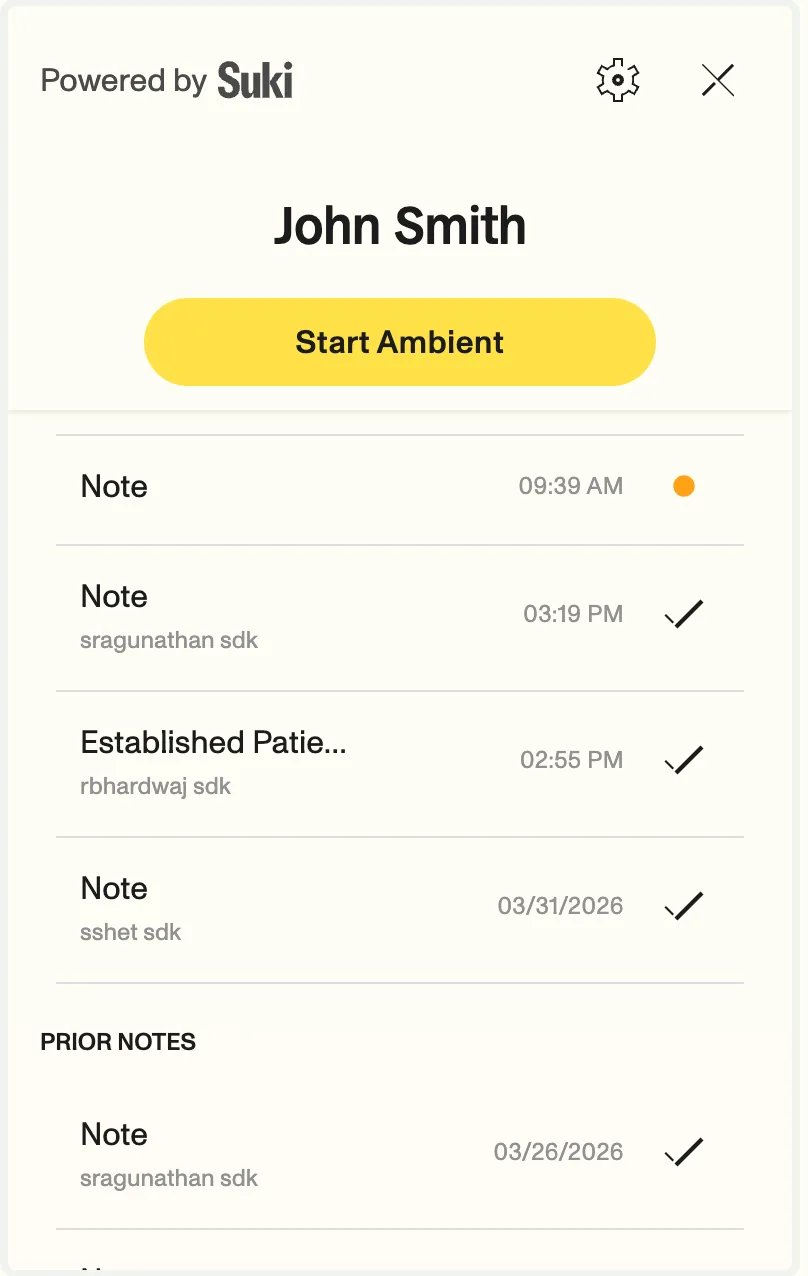
Why it matters: When more than one note is created on the same day, clinicians can see labels like
ESTABLISHED_PATIENT or WELLNESS instead of several rows that all say Note.Learn more in the Note management guide.Mobile SDK v2.6.0Medication orders in session context: We have added optional orders info for Suki iOS SDK ambient sessions. You can now include medications tied to a visit, such as those from your EHR, while keeping your session creation flow the same.Implementation steps:To include medication orders, follow these requirements:- Method call: After you create the session, call
setSessionContext(with:)using theSukiAmbientConstant.kOrdersInfoconstant. - Data structure: Place each order within the
MedicationOrderKeys.kMedicationOrderskey.
Mobile SDK v2.6.0EMR info in session context: We have added optional EMR info for Suki iOS SDK ambient sessions. You can now include information about the EMR system that applies to the session, such as the vendor code or environment-specific label.Implementation steps:To include EMR info, follow these requirements:
- Method call: After you create the session, call
setSessionContext(with:)using theSukiAmbientConstant.kEmrInfoconstant. - Data structure: Place the EMR info within the
SukiAmbientConstant.kEmrInfokey. - Required fields: The
SukiAmbientConstant.kTargetEmrkey is required with a string identifier for the target EMR.
API v1.3.0Medication order support: Medication orders are now supported in the API. You can now send and retrieve medication orders for an ambient session and encounter using the following endpoints:
- GET /api/v1/ambient/session//structured-data.
- GET /api/v1/ambient/session//encounter-structured-data.
- POST /api/v1/ambient/session//context.
- GET /api/v1/ambient/session//content.
- GET /api/v1/ambient/session//encounter-content.