

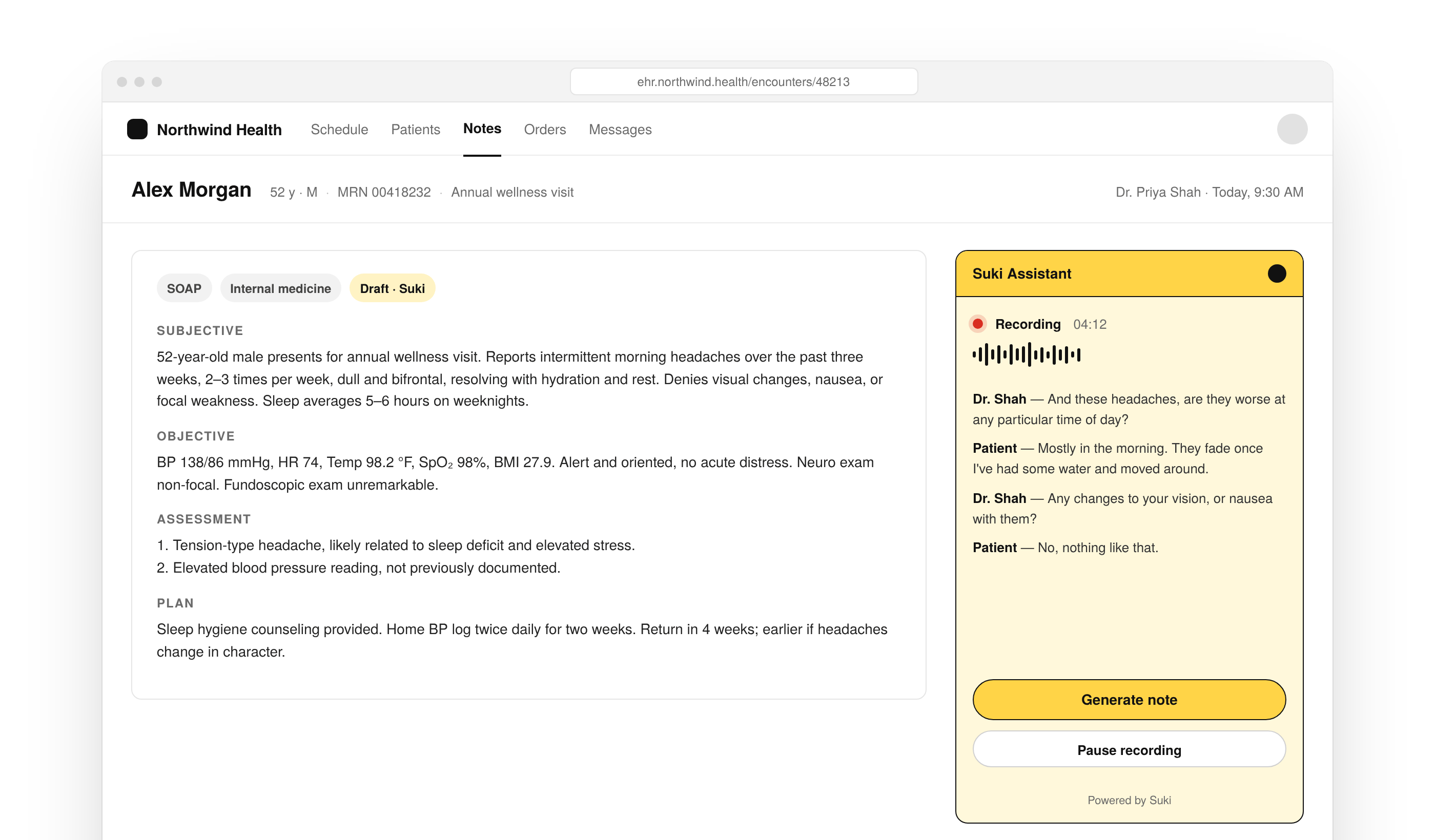
Integrate with the Suki Web SDK to get Suki’s ACI capabilities, such as Ambient documentation, in a headed JavaScript and React SDK with components, APIs, and hooks, and embed a pre-built clinician UI in your web app.
Get started
Confirm requirements, install the SDK, authenticate, and run your first Ambient session.Introduction
Learn how the Web SDK works and when to use it in your application.
Prerequisites
Confirm Partner credentials, browser support, and setup requirements before you install.
Install the SDK
Install the JavaScript or React package and add the SDK to your application.
Authenticate
Learn how Partner Tokens and provider identity work in the Web SDK.
Run Your First Session
Initialize, mount, and run the Web SDK session end to end.
Choose a workflow
Choose the clinician workflow you want to add first. Use Ambient to capture visits. Add Dictation or Form filling when your application needs those flows.Ambient
Learn how Ambient sessions capture conversations and generate clinical notes.
Dictation
Use built-in Dictation while clinicians create or edit notes.
Form Filling
Capture structured medical form data with Form filling in the Web SDK.
Patient Summary
Show pre-visit Patient Summary on the headed patient profile.
Build and customize Web SDK
After your workflow is running, wire the session lifecycle, handle note submission, and adapt the UI to your application.Create Session
Create an Ambient session, start recording, and pass encounter context.
Session Status and Events
Track session lifecycle, status, and events during an Ambient session.
Note Management
Review, edit, and submit notes, then write content back to your EHR.
Dictation for JavaScript
Add Dictation to a JavaScript Web SDK integration.
Dictation for React
Add Dictation to a React Web SDK integration.
Form Filling for JavaScript
Add Form filling to a JavaScript Web SDK integration.
Form Filling for React
Add Form filling to a React Web SDK integration.
Branding and Layout
Customize theme and layout options for the Web SDK UI.
Minimized Layout
Embed a compact Web SDK layout when space in your UI is limited.
Minimized Layout Implementation
Implement the minimized layout in your application.
Web SDK capabilities
Add these capabilities when your Ambient workflow needs more clinical depth, care settings, or session reliability.Medication Orders
Capture medication order content from Ambient sessions in the Web SDK.
Problem-Based Charting
Pass problem context so Ambient notes organize findings around diagnoses.
Interoperability
Continue the same clinical note across Ambient APIs, Mobile SDK, and Web SDK.
Multilingual Sessions
Configure language options for Ambient sessions in the Web SDK.
Telehealth
Use the Web SDK in telehealth workflows.
Session Recovery
Recover or continue an Ambient session when recording is interrupted.
Offline Mode
Buffer audio during network interruptions and sync when connectivity returns.
API references
Use the API reference when you need exact types, methods, or component contracts. For React, start with Hooks, Providers, and Components. For JavaScript, start with Classes and Functions. Types apply to both.Types
Browse Web SDK types for initialization, data models, and events.
Hooks
Use React hooks for Ambient, auth, and session workflows.
Providers
Wrap your application with Web SDK providers for React integrations.
Components
Use Web SDK UI components in React applications.
Functions
Call Web SDK functions for mount, session control, and configuration.
Classes
Use Web SDK classes in JavaScript integrations.
Resources
Use these resources when you need examples, tutorials, troubleshooting help, release details, or support for an existing integration.Examples
Browse Web SDK examples for common integration patterns.
React Tutorial
Build an Ambient session with the Web SDK in React.
PBC Tutorial
Build Problem-Based Charting with the Web SDK.
Error Handling
Handle Web SDK errors during initialization, sessions, and submission.
Token Refresh
Keep Partner Tokens valid during long-running Web SDK sessions.
FAQs
Find answers to general, technical, implementation, and onboarding questions.
Changelog
Track Web SDK releases, enhancements, and breaking changes.
Migration Guides
Upgrade an existing Web SDK integration to a newer version.
Support
Contact Suki for partner documentation and SDK support.